
 数据结构
数据结构 网络
网络 RDBMS
RDBMS 操作系统
操作系统 Java
Java MS Excel
 iOS
iOS HTML
HTML CSS
CSS Android
 Python
 C 编程
C 编程 C++
C++ C#
C# MongoDB
 MySQL
MySQL Javascript
 PHP
PHP 物理学
物理学 化学
化学 生物学
生物学 数学
数学 英语
英语 经济学
经济学 心理学
心理学 社会学
社会学 时尚研究
时尚研究 法律研究
法律研究如何在 Java 中使用 GridBagLayout 居中 JPanel 中的 JLabel?
用 GridBagLayout 居中 JPanel 中的组件。我们先在其中创建一个 JFrame 和 JPanel -
JFrame frame = new JFrame("Demo Frame");
JPanel panel = new JPanel();
现在,我们将添加我们的组件 -
JLabel label = new JLabel("Demo Label (Centered)");
label.setForeground(Color.white);
JCheckBox checkBox = new JCheckBox("Checkbox (Centered)");
设置布局 -
panel.setLayout(new GridBagLayout());
以下是用 GridBagLayout 居中面板中标签的示例 -
示例
package my;
import java.awt.Color;
import java.awt.GridBagLayout;
import javax.swing.JCheckBox;
import javax.swing.JFrame;
import javax.swing.JLabel;
import javax.swing.JPanel;
import javax.swing.WindowConstants;
public class SwingDemo {
   public static void main(String[] args) {
      JFrame frame = new JFrame("Demo Frame");
      JPanel panel = new JPanel();
      JLabel label = new JLabel("Demo Label (Centered)");
      label.setForeground(Color.white);
      JCheckBox checkBox = new JCheckBox("Checkbox (Centered)");
      panel.setLayout(new GridBagLayout());
      panel.add(label);
      panel.add(checkBox);
      panel.setBackground(Color.blue);
      frame.setDefaultCloseOperation(WindowConstants.EXIT_ON_CLOSE);
      frame.add(panel);
      frame.setSize(600, 400);
      frame.setVisible(true);
   }
}
输出
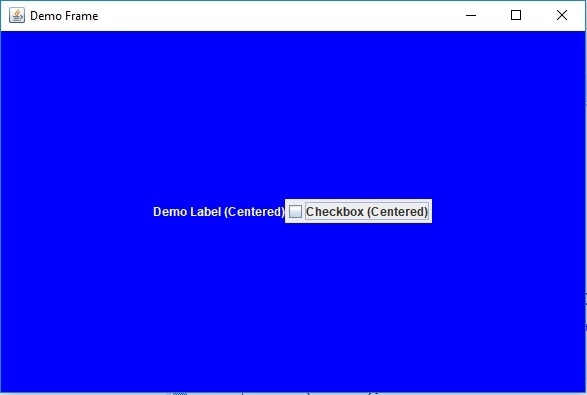

更新于:2019 年 7 月 30 日
794 次浏览

广告