
 数据结构
数据结构 网络
网络 关系数据库管理系统 (RDBMS)
 操作系统
操作系统 Java
Java MS Excel
 iOS
iOS HTML
HTML CSS
CSS Android
 Python
 C 语言编程
 C++
C++ C#
C# MongoDB
 MySQL
MySQL Javascript
 PHP
PHP 物理学
物理学 化学
化学 生物学
生物学 数学
数学 英语
英语 经济学
经济学 心理学
心理学 社会学
社会学 服装学
服装学 法学
法学如何在 Seaborn 中将图形样式更改为 Darkgrid?
Seaborn 提供多种内置图形样式,我们可以从中选择来增强绘图的视觉效果。这些样式会影响各种元素,例如颜色、网格线、背景和字体。要在 Seaborn 中设置图形样式,我们可以使用 **`sns.set_style()`** 函数。以下是 Seaborn 库中可用的图形样式。
**Darkgrid** - 此样式具有深灰色背景和网格线,有助于将注意力集中在数据点上。
**Whitegrid** - 此样式类似于“**darkgrid**”,但具有白色背景,使其适合具有较浅颜色方案的绘图。
**Dark** - 此样式具有深色背景,没有网格线,使绘图看起来简洁明了。
**White** - 此样式类似于“**dark**”,但具有白色背景,对于具有较浅颜色的绘图非常有用。
**Ticks** - 此样式删除背景网格,仅显示轴上的刻度标记。
在本文中,我们将了解如何在 seaborn 中将图形样式更改为 Dark Grid。要在 Seaborn 中将图形样式更改为“**darkgrid**”,我们可以按照以下步骤操作。
安装 Seaborn
我们应该确保已在 Python 环境中安装 Seaborn。我们可以在 Python 工作环境中使用 **pip** 命令安装它。
pip install seaborn
导入必要的库
在我们的 Python 脚本或 Jupyter Notebook 中,接下来我们必须导入所需的库,例如 Seaborn 和 Matplotlib.pyplot。
import seaborn as sns
import matplotlib.pyplot as plt
设置图形样式
使用 **`sns.set_style()`** 函数将图形样式设置为“**darkgrid**”。此函数修改 Matplotlib 的默认样式。
sns.set_style("darkgrid")
这行代码将图形样式设置为“**darkgrid**”。
绘制数据
现在我们可以使用 Seaborn 和 Matplotlib 创建和自定义我们的绘图。这是一个绘制条形图的简单示例。
示例
在此示例中,**`sns.barplot()`** 使用 Seaborn 创建条形图。以下几行使用 Matplotlib 设置 x 轴标签、y 轴标签和标题。最后,**`plt.show()`** 显示绘图。
import seaborn as sns
import matplotlib.pyplot as plt

x = ["A", "B", "C", "D"]
y = [10, 20, 15, 25]
# Create a bar plot
sns.barplot(x=x, y=y)
# Set labels and title
plt.xlabel("Categories")
plt.ylabel("Values")
plt.title("Bar Chart")
# Display the plot
plt.show()
输出

自定义
我们可以使用各种 Seaborn 函数和 Matplotlib 选项进一步自定义我们的绘图。例如,我们可以调整调色板、字体大小、网格线等。有关更多自定义选项,请参阅 Seaborn 文档。
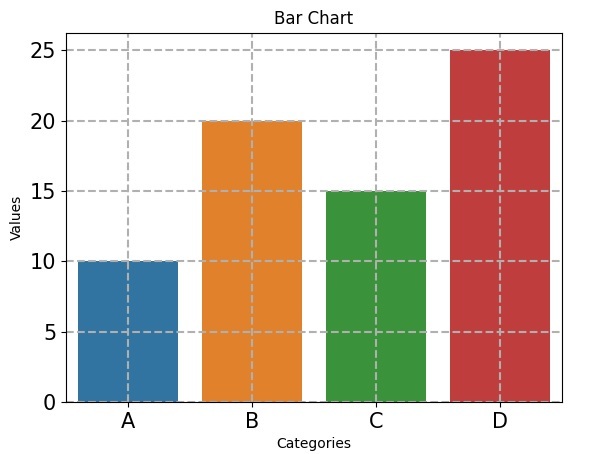
以下几行代码演示了一些额外的自定义,其中 **`sns.set_palette()`** 将调色板更改为“**husl**”。**`plt.xticks()`** 和 **`plt.yticks()`** 分别设置 x 轴和 y 轴刻度的字体大小。**`plt.grid()`** 使用虚线样式和 0.5 的线宽向绘图添加网格线。
示例
import seaborn as sns
import matplotlib.pyplot as plt

x = ["A", "B", "C", "D"]
y = [10, 20, 15, 25]
# Create a bar plot
sns.barplot(x=x, y=y)
sns.set_palette("husl")  # Change the color palette
plt.xticks(fontsize=15)  # Set x-axis tick font size
plt.yticks(fontsize=15)  # Set y-axis tick font size
plt.grid(True, linestyle="--", linewidth=1.5)  # Add grid lines
# Set labels and title
plt.xlabel("Categories")
plt.ylabel("Values")
plt.title("Bar Chart")
# Display the plot
plt.show()
输出

浏览量:382
