
 数据结构
数据结构 网络
网络 关系数据库管理系统
 操作系统
操作系统 Java
Java MS Excel
 iOS
iOS HTML
HTML CSS
CSS Android
 Python
 C 编程
C 编程 C++
C++ C#
C# MongoDB
 MySQL
MySQL Javascript
 PHP
PHP 物理
物理 化学
化学 生物
生物 数学
数学 英语
英语 经济学
经济学 心理学
心理学 社会学
社会学 时尚研究
时尚研究 法律研究
法律研究如何在 Java 中将基本数据类型转换为包装类?
Java 在 java.lang 包中提供了一些称为包装类的类。这些类的对象将基本数据类型封装在其中。
使用包装类,您还可以将基本数据类型添加到各种集合对象中,例如 ArrayList、HashMap 等。您还可以使用包装类通过网络传递基本值。
示例
import java.util.Scanner;
public class WrapperExample {
   public static void main(String args[]){
      Scanner sc = new Scanner(System.in);
      System.out.println("Enter an integer value: ");
      int i = sc.nextInt();
      //Wrapper class of an integer
      Integer obj = new Integer(i);
      //Converting Integer object to String
      String str = obj.toString();
      System.out.println(str);
      //Comparing with other object
      int result = obj.compareTo(new Integer("124"));
      if(result==0) {
         System.out.println("Both are equal");
      }else{
         System.out.println("Both are not equal");
      }
   }
}
输出
Enter an integer value:
1211
1211
Both are not equalHow to create and use directories in Java?
创建目录
就像文件类一样,java.nio 包的 Files 类提供了一个 **createTempFile()** 方法,它接受两个表示前缀和后缀的字符串参数,并创建一个具有指定详细信息的临时文件。
**Files** 类的 **createDirectory()** 方法接受所需目录的路径并创建一个新目录。
示例
以下示例使用 Files 类的 createDirectory() 方法创建一个新目录。
import java.io.IOException;
import java.nio.file.Files;
import java.nio.file.Path;
import java.nio.file.Paths;
public class Test {
   public static void main(String args[]) throws IOException {
      //Creating a path object
      String pathStr = "D:\sample_directory ";
      Path path = Paths.get(pathStr);
      //Creating a directory
      Files.createDirectory(path);
      System.out.println("Directory created successfully");
   }
}
输出
Directory created successfully
如果进行验证,您可以观察到创建的目录如下所示:
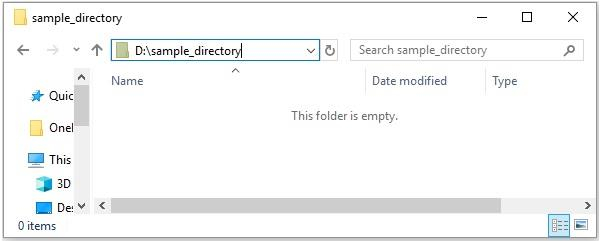
列出目录内容
**Files** 类的 **newDirectoryStream()** 方法在给定路径中打开目录并返回目录流,该目录流给出目录的内容。
示例
import java.io.IOException;
import java.nio.file.DirectoryStream;
import java.nio.file.Files;
import java.nio.file.Path;
import java.nio.file.Paths;
public class FilesExample {
   public static void main(String args[]) throws IOException {
      //Creating a path object
      String pathStr = "D:\ExampleDirectory";
      Path path = Paths.get(pathStr);
      System.out.println("Contents off the specified directory");
      DirectoryStream stream = Files.newDirectoryStream(path);
      for (Path file: stream) {
         System.out.println(file.getFileName());
      }
   }
}
输出
Contents off the specified directory
demo1.pdf
demo2.pdf
sample directory1
sample directory2
sample directory3
sample directory4
sample_jpeg1.jpg
sample_jpeg2.jpg
test
test1.docx
test2.docx
使用目录过滤器
您可以使用 DirectoryStream.Filter 过滤目录,以下示例过滤指定路径中的目录。
示例
import java.io.IOException;
import java.nio.file.DirectoryStream;
import java.nio.file.Files;
import java.nio.file.Path;
import java.nio.file.Paths;
public class Test {
   public static void main(String args[]) throws IOException {
      //Creating a path object
      String pathStr = "D:\ExampleDirectory";
      Path path = Paths.get(pathStr);
      System.out.println("Directories in the specified directory");
      DirectoryStream.Filter filter = new DirectoryStream.Filter(){
         public boolean accept(Path file) throws IOException {
            return (Files.isDirectory(file));
         }
      };
      DirectoryStream list = Files.newDirectoryStream(path, filter);
      for (Path file : list) {
         System.out.println(file.getFileName());
      }
   }
}
输出
Directories in the specified directory
hidden directory1
hidden directory2
sample directory1

更新于: 2021年2月6日
1K+ 浏览量

广告