
 数据结构
数据结构 网络
网络 关系型数据库管理系统
 操作系统
操作系统 Java
Java MS Excel
 iOS
iOS HTML
HTML CSS
CSS Android
 Python
 C 编程
C 编程 C++
C++ C#
C# MongoDB
 MySQL
MySQL Javascript
 PHP
PHP 物理
物理 化学
化学 生物
生物 数学
数学 英语
英语 经济
经济 心理学
心理学 社会科学
社会科学 时尚研究
时尚研究 法律研究
法律研究如何使用 JavaScript 和 CSS 创建模式弹出窗口?
创建模式弹出窗口意味着添加一个对话框,该对话框在点击按钮时生成并在用户点击弹出窗口外部的任意位置时关闭。
以下是带有标题和文本的弹出窗口的显示方式。你还可以为其添加一个页脚 −
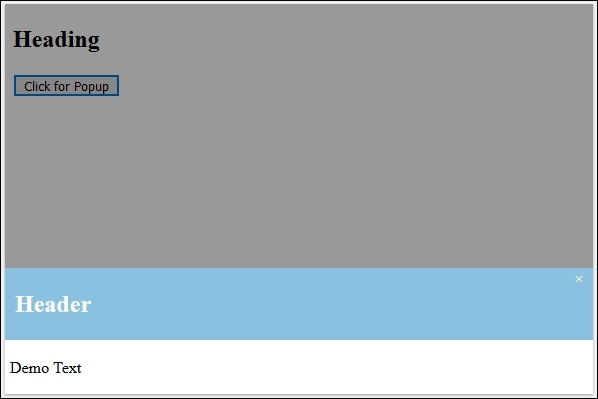
要使用 CSS 和 JavaScript 创建模式弹出窗口,请尝试运行以下代码 −
示例
<!DOCTYPE html>
<html>
   <head>
      <style>
         .popup {
            display: none;
            position: fixed;
            z-index: 1;
            left: 0;
            top: 0;
            width: 100%;
            height: 100%;
            background-color: #F1F1F1;
            background-color: rgba(0,0,0,0.4);
            -webkit-animation-name: fadeIn;
            -webkit-animation-duration: 0.4s;
            animation-name: fadeIn;
            animation-duration: 0.4s
         }
         .popup-content {
            position: fixed;
            bottom: 0;
            background-color: #ffffff;
            width: 100%;
            -webkit-animation-name: slideIn;
            -webkit-animation-duration: 0.5s;
            animation-name: slideIn;
            animation-duration: 0.5s
         }
         .end {
            color: white;
            float: right;
            font-size: 15px;
            font-weight: bold;
         }
         .end:hover,
         .end:focus {
            color: #000;
            text-decoration: underline;
            cursor: pointer;
         }
         .popup-header {
            padding: 1px 10px;
            background-color: #8AC1E0;
            color: white;
         }
         .popup-body {padding: 1px 5px;}
         @-webkit-keyframes slideIn {
            from {bottom: -300px; opacity: 0}
            to {bottom: 0; opacity: 1}
         }
         @keyframes slideIn {
            from {bottom: -300px; opacity: 0}
            to {bottom: 0; opacity: 1}
         }
         @-webkit-keyframes fadeIn {
            from {opacity: 0}
            to {opacity: 1}
         }
         @keyframes fadeIn {
            from {opacity: 0}
            to {opacity: 1}
         }
      </style>
   </head>
   <body>
      <h2>Heading</h2>
      <button id="btn">Click for Popup</button>
      <div id="myModal" class="popup">
         <!-- Modal content -->
         <div class="popup-content">
            <div class="popup-header">
               <span class="end">×</span>
               <h2>Header</h2>
            </div>
            <div class="popup-body">
               <p>Demo Text</p>
            </div>
         </div>
      </div>
      <script>
         var popup = document.getElementById('myModal');
         var myBytton = document.getElementById("btn");
         var span = document.getElementsByClassName("end")[0];
         myBytton.onclick = function() {
            popup.style.display = "block";
         }
         span.onclick = function() {
            popup.style.display = "none";
         }
         window.onclick = function(event) {
            if (event.target == popup) {
               popup.style.display = "none";
            }
         }
      </script>
   </body>
</html>

更新时间:2020 年 6 月 16 日
498 次浏览

广告