
 数据结构
数据结构 网络
网络 RDBMS
RDBMS 操作系统
操作系统 Java
Java MS Excel
 iOS
iOS HTML
HTML CSS
CSS Android
 Python
 C 编程
C 编程 C++
C++ C#
C# MongoDB
 MySQL
MySQL Javascript
 PHP
PHP 物理学
物理学 化学
化学 生物学
生物学 数学
数学 英语
英语 经济学
经济学 心理学
心理学 社会学
社会学 时尚研究
时尚研究 法律研究
法律研究如何使用 JavaFX 创建单选按钮?
按钮是一个组件,在按下时执行操作(如提交、登录等)。它通常用文本或图像标记,指定相应操作。
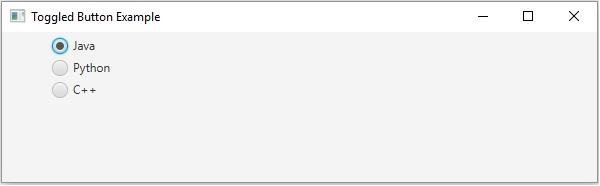
单选按钮是一种形状为圆形的按钮。它有两种状态,选中和未选中。通常,单选按钮使用切换组进行分组,其中你只能选择其中的一个。
你可以通过实例化 javafx.scene.control.RadioButton 类在 JavaFX 中创建一个单选按钮,它 является的子类 ToggleButton 类。每当按下或释放单选按钮时都会生成操作。你可以使用 setToggleGroup() 方法将单选按钮设置到一个组中。
示例
import javafx.application.Application;
import javafx.geometry.Insets;
import javafx.scene.Scene;
import javafx.scene.control.RadioButton;
import javafx.scene.control.ToggleGroup;
import javafx.scene.layout.VBox;
import javafx.scene.paint.Color;
import javafx.stage.Stage;
public class RadioButtonExample extends Application {
   @Override
   public void start(Stage stage) {
      //Creating toggle buttons
      RadioButton button1 = new RadioButton("Java");
      RadioButton button2 = new RadioButton("Python");
      RadioButton button3 = new RadioButton("C++");
      //Toggle button group
      ToggleGroup group = new ToggleGroup();
      button1.setToggleGroup(group);
      button2.setToggleGroup(group);
      button3.setToggleGroup(group);
      //Adding the toggle button to the pane
      VBox box = new VBox(5);
      box.setFillWidth(false);
      box.setPadding(new Insets(5, 5, 5, 50));
      box.getChildren().addAll(button1, button2, button3);
      //Setting the stage
      Scene scene = new Scene(box, 595, 150, Color.BEIGE);
      stage.setTitle("Toggled Button Example");
      stage.setScene(scene);
      stage.show();
   }
   public static void main(String args[]){
      launch(args);
   }
}
输出

更新于: 2020 年 5 月 16 日
1 千 + 次浏览

广告