
 数据结构
数据结构 网络
网络 关系型数据库管理系统
 操作系统
操作系统 Java
Java MS Excel
 iOS
iOS HTML
HTML CSS
CSS Android
 Python
 C 编程
C 编程 C++
C++ C#
C# MongoDB
 MySQL
MySQL Javascript
 PHP
PHP 物理
物理 化学
化学 生物
生物 数学
数学 英语
英语 经济
经济 心理学
心理学 社会学
社会学 时尚研究
时尚研究 法律研究
法律研究JavaFX 示例,在单选按钮中添加工具提示
单选按钮
单选按钮是一种按钮,形状为圆形。它有两个状态,选中和未选中。通常,单选按钮使用切换组进行分组,您只能选择其中一个。您可以通过创建javafx.scene.control.RadioButton类来在 JavaFX 中创建单选按钮。
工具提示
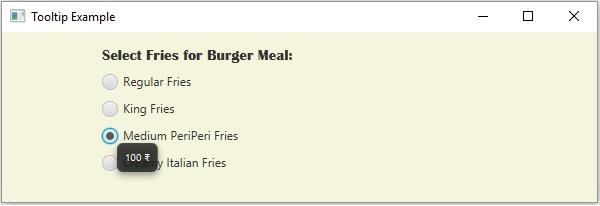
只要在应用程序中将鼠标指针悬停在某个元素(例如,按钮、标签等)上,工具提示就会显示有关该元素的提示。在 JavaFX 中,工具提示由javafx.scene.control.Tooltip类表示,您可以通过创建它来创建一个工具提示。
在创建类时,需要将文本传递到其构造函数作为参数(或使用 setText() 方法设置文本)。
示例
import javafx.application.Application;
import javafx.geometry.Insets;
import javafx.scene.Group;
import javafx.scene.Scene;
import javafx.scene.control.Label;
import javafx.scene.control.RadioButton;
import javafx.scene.control.ToggleGroup;
import javafx.scene.control.Tooltip;
import javafx.scene.layout.VBox;
import javafx.scene.paint.Color;
import javafx.scene.text.Font;
import javafx.stage.Stage;
public class Tooltip_ApplicationData extends Application {
   public void start(Stage stage) {
      //Creating a label
      Label label = new Label("Select Fries for Burger Meal:");
      label.setFont(new Font("Britannic Bold", 15));
      //Creating the Radio buttons
      RadioButton rb1 = new RadioButton("Regular Fries");
      RadioButton rb2 = new RadioButton("King Fries");
      RadioButton rb3 = new RadioButton("Medium Peri Peri Fries");
      RadioButton rb4 = new RadioButton("Creamy Italian Fries");
      //Adding the buttons to the toggle group
      ToggleGroup group = new ToggleGroup();
      group.getToggles().addAll(rb1, rb2, rb3, rb4);
      //Creating tool tips
      Tooltip toolTip1 = new Tooltip("70 ₹");
      Tooltip toolTip2 = new Tooltip("90 ₹");
      Tooltip toolTip3 = new Tooltip("100 ₹");
      Tooltip toolTip4 = new Tooltip("120 ₹");
      //Adding tool tips to the radio buttons
      rb1.setTooltip(toolTip1);
      rb2.setTooltip(toolTip2);
      rb3.setTooltip(toolTip3);
      rb4.setTooltip(toolTip4);
      //Adding the toggle button to the pane
      VBox vBox = new VBox(10);
      vBox.setPadding(new Insets(15, 5, 5, 100));
      vBox.getChildren().addAll(label, rb1, rb2, rb3, rb4 );
      //Setting the stage
      Scene scene = new Scene(new Group(vBox), 595, 170, Color.BEIGE);
      stage.setTitle("Tooltip Example");
      stage.setScene(scene);
      stage.show();
   }
   public static void main(String args[]){
      launch(args);
   }
}
输出

更新于:2020 年 5 月 20 日
297 次浏览

广告