
 数据结构
数据结构 网络
网络 关系数据库管理系统
 操作系统
操作系统 Java
Java MS Excel
 iOS
iOS HTML
HTML CSS
CSS Android
 Python
 C 编程
C 编程 C++
C++ C#
C# MongoDB
 MySQL
MySQL Java 脚本
 PHP
PHP 物理
物理 化学
化学 生物
生物 数学
数学 英语
英语 经济学
经济学 心理学
心理学 社会学
社会学 时尚研究
时尚研究 法律学习
法律学习如何在 JavaFX 中向按钮添加图像(操作)?
按钮控件在用户界面应用程序中,一般来说,单击按钮时它会执行相应的操作。你可以通过实例化 javafx.scene.control.Button 类创建按钮。
向按钮添加图像
可以使用Button 类的 setGraphic() 方法(继承自javafx.scene.control.Labeled 类)向按钮添加图形对象(节点)。该方法接受表示图形(图标)的 Node 类的对象。
向按钮添加图像 -
通过绕过所需图形的路径创建 Image 对象。
使用图像对象创建 ImageView 对象。
通过实例化 Button 类创建按钮。
最后,通过将 ImageView 对象作为参数传递给按钮,调用 setGraphic() 方法。
例
import javafx.application.Application;
import javafx.scene.Group;
import javafx.scene.Scene;
import javafx.scene.control.Button;
import javafx.scene.image.Image;
import javafx.scene.image.ImageView;
import javafx.scene.paint.Color;
import javafx.stage.Stage;
public class ButtonGraphis extends Application {
   public void start(Stage stage) {
      //Creating a graphic (image)
      Image img = new Image("UIControls/logo.png");
      ImageView view = new ImageView(img);
      view.setFitHeight(80);
      view.setPreserveRatio(true);
      //Creating a Button
      Button button = new Button();
      //Setting the location of the button
      button.setTranslateX(200);
      button.setTranslateY(25);
      //Setting the size of the button
      button.setPrefSize(80, 80);
      //Setting a graphic to the button
      button.setGraphic(view);
      //Setting the stage
      Group root = new Group(button);
      Scene scene = new Scene(root, 595, 170, Color.BEIGE);
      stage.setTitle("Button Graphics");
      stage.setScene(scene);
      stage.show();
   }
   public static void main(String args[]){
      launch(args);
   }
}
输出
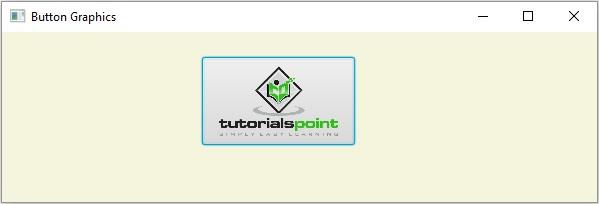

更新日期:16-5-2020
14K+ 次浏览

广告