
 数据结构
数据结构 网络
网络 RDBMS
RDBMS 操作系统
操作系统 Java
Java MS Excel
 iOS
iOS HTML
HTML CSS
CSS Android
 Python
 C 编程
C 编程 C++
C++ C#
C# MongoDB
 MySQL
MySQL Javascript
 PHP
PHP 物理
物理 化学
化学 生物
生物 数学
数学 英语
英语 经济学
经济学 心理学
心理学 社会研究
社会研究 时尚研究
时尚研究 法律研究
法律研究如何使用 Swing 显示 OpenCV Mat 对象?
ImageIcon 类是 Icon 接口的一种实现,用于从图像绘制图标。你可以使用此类在 Swing 窗口中显示图像,该类的构造函数接受一个 BufferedImage 对象作为参数。
因此,若要使用 Swing 窗口显示存储在 Mat 对象中的 OpenCV 图像,你需要将其转换为 BufferedImage 对象,并将其作为参数传递给 ImageIcon 方法。
示例
import java.awt.image.BufferedImage;
import java.io.ByteArrayInputStream;
import java.io.InputStream;
import javax.imageio.ImageIO;
import javax.swing.ImageIcon;
import javax.swing.JFrame;
import javax.swing.JLabel;
import org.opencv.core.Core;
import org.opencv.core.Mat;
import org.opencv.core.MatOfByte;
import org.opencv.imgcodecs.Imgcodecs;
public class DisplayingImagesUsingSwings {
   public static void main(String args[]) throws Exception {
      //Loading the OpenCV core library
      System.loadLibrary( Core.NATIVE_LIBRARY_NAME );
      //Reading the Image from the file
      String file = "D:\images\tree.jpg";
      Mat image = Imgcodecs.imread(file);
      //Encoding the image
      MatOfByte matOfByte = new MatOfByte();
      Imgcodecs.imencode(".jpg", image, matOfByte);
      //Storing the encoded Mat in a byte array
      byte[] byteArray = matOfByte.toArray();
      //Preparing the Buffered Image
      InputStream in = new ByteArrayInputStream(byteArray);
      BufferedImage bufImage = ImageIO.read(in);
      //Instantiate JFrame
      JFrame frame = new JFrame();
      //Set Content to the JFrame
      frame.getContentPane().add(new JLabel(new ImageIcon(bufImage)));
      frame.pack();
      frame.setVisible(true);
      System.out.println("Image Loaded");
   }
}
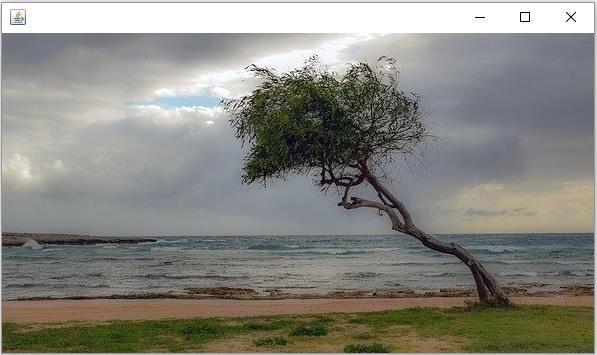
输出
执行时,上述程序将生成以下输出 −

更新于: 2020 年 4 月 10 日
468 次浏览

广告