
 数据结构
数据结构 网络
网络 关系数据库管理系统 (RDBMS)
 操作系统
操作系统 Java
Java MS Excel
 iOS
iOS HTML
HTML CSS
CSS Android
 Python
 C语言编程
C语言编程 C++
C++ C#
C# MongoDB
 MySQL
MySQL Javascript
 PHP
PHP 物理学
物理学 化学
化学 生物学
生物学 数学
数学 英语
英语 经济学
经济学 心理学
心理学 社会学
社会学 服装研究
服装研究 法律研究
法律研究如何使用OpenCV Python将椭圆拟合到图像中的物体?
我们可以使用函数cv2.fitEllipse()将椭圆拟合到物体上。椭圆内接于旋转矩形。旋转矩形是包含物体的最小面积的边界矩形。
语法
此函数使用的语法为:
ellipse = cv2.fitEllipse(cnt)
其中,“cnt”是轮廓点。它表示为轮廓点的数组。
输出 - 它返回一个元组的元组,格式为((x,y), (majorAxis, minorAxis), angle)。(x,y)是中心的坐标,(majorAxis, minorAxis)是短轴和长轴的长度,angle是椭圆的旋转角度。
要在输入图像上绘制椭圆,我们使用以下函数:
cv2.ellipse(img,ellipse, (0,0,255), 3)
步骤
您可以使用以下步骤将椭圆拟合到物体:
导入所需的库。在以下所有Python示例中,所需的Python库为OpenCV。确保您已安装它。
import cv2
使用cv2.imread()读取输入图像并将其转换为灰度图像。这里我们加载名为star1.png的图像。
img = cv2.imread('star1.png')
gray = cv2.cvtColor(img, cv2.COLOR_BGR2GRAY)
对灰度图像应用阈值处理以创建二值图像。调整第二个参数以获得更好的轮廓检测。
ret,thresh = cv2.threshold(gray,150,255,0)
使用cv2.findContours()函数查找图像中的轮廓。
contours, _ = cv2.findContours(thresh, cv2.RETR_TREE, cv2.CHAIN_APPROX_SIMPLE)
选择一个轮廓“cnt”或循环遍历所有轮廓。使用“cv2.fitEllipse(cnt)”函数将椭圆拟合到物体轮廓“cnt”。
cnt = contours[0]
ellipse = cv2.fitEllipse(cnt)
在输入图像上绘制椭圆。
cv2.ellipse(img,ellipse, (0,0,255), 3)
显示带有绘制的凸包的图像。
cv2.imshow("Ellipse", img)
cv2.waitKey(0)
cv2.destroyAllWindows()
让我们看一些例子以便更清楚地理解。
我们使用以下图像作为以下示例的输入文件。

示例1
在下面的Python程序中,我们检测图像中物体的轮廓并找到拟合物体的椭圆。我们在输入图像上绘制椭圆。
# import required libraries
import cv2
import numpy as np

# load the input image
img = cv2.imread('star1.png')
gray = cv2.cvtColor(img, cv2.COLOR_BGR2GRAY)

# apply thresholding to convert grayscale to binary image
ret,thresh = cv2.threshold(gray,150,255,0)

# find the contours
contours,hierarchy = cv2.findContours(thresh, cv2.RETR_TREE,cv2.CHAIN_APPROX_SIMPLE)
print("Number of contours detected:", len(contours))

# select the first contour
cnt = contours[0]

# fit the ellipse to the selected object
ellipse = cv2.fitEllipse(cnt)

# draw the ellipse on the input image
cv2.ellipse(img,ellipse, (0,0,255), 3)

# display the image with an ellipse drawn on it.
cv2.imshow("Ellipse", img)
cv2.waitKey(0)
cv2.destroyAllWindows()
输出
执行上述代码后,将产生以下输出:
Number of contours detected: 1
我们将得到以下输出窗口:
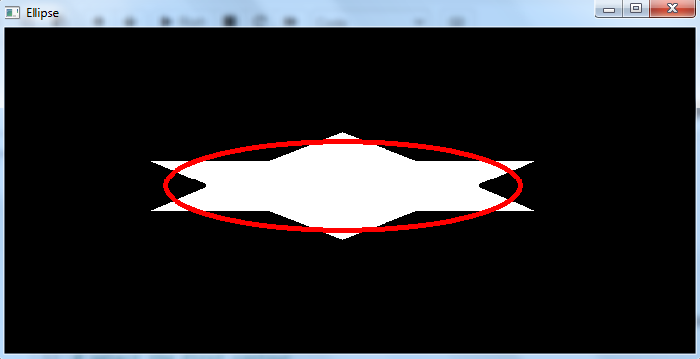
拟合检测到的物体的椭圆以红色绘制。
让我们找到椭圆内接的旋转矩形。
示例2
在这个Python程序中,我们检测图像中物体的轮廓并找到拟合物体的椭圆。我们还找到椭圆内接的旋转矩形。我们在输入图像上绘制椭圆和旋转矩形。
# import required libraries
import cv2
import numpy as np

# load the input image
img = cv2.imread('star1.png')
gray = cv2.cvtColor(img, cv2.COLOR_BGR2GRAY)

# apply thresholding to convert grayscale to binary image
ret,thresh = cv2.threshold(gray,150,255,0)

# find the contours
contours,hierarchy = cv2.findContours(thresh, cv2.RETR_TREE,cv2.CHAIN_APPROX_SIMPLE)
print("Number of contours detected:", len(contours))

# select the first contour
cnt = contours[0]

# find the minimum area rectangle
rect = cv2.minAreaRect(cnt)
box = cv2.boxPoints(rect)
box = np.int0(box)
cv2.drawContours(img,[box],0,(0,255,255),2)

# fit the ellipse
ellipse = cv2.fitEllipse(cnt)
cv2.ellipse(img,ellipse, (0,0,255), 3)

# display the image with an ellipse drawn on it.
cv2.imshow("ellipse", img)
cv2.waitKey(0)
cv2.destroyAllWindows()
输出
执行上述代码后,将产生以下输出:
Number of contours detected: 1
我们将得到以下输出窗口:

椭圆以红色绘制,旋转矩形(最小面积)以黄色绘制。请注意,椭圆内接于旋转矩形内。

9K+ 次浏览
