
 数据结构
数据结构 网络
网络 RDBMS
RDBMS 操作系统
操作系统 Java
Java MS Excel
 iOS
iOS HTML
HTML CSS
CSS Android
 Python
 C 编程
C 编程 C++
C++ C#
C# MongoDB
 MySQL
MySQL Javascript
 PHP
PHP 物理
物理 化学
化学 生物
生物 数学
数学 英语
英语 经济
经济 心理学
心理学 社会学
社会学 时尚研究
时尚研究 法律研究
法律研究如何完全更改 Tkinter 列表框的颜色?
Tkinter Listbox 小部件对于以列表项的形式表示大量数据项非常有用。为了配置诸如更改整个 Listbox 的背景颜色之类的属性,我们可以使用 configure(**options) 方法更改 Listbox 小部件的属性。
示例
# Import the required libraries
from tkinter import *

# Create an instance of tkinter frame or window
win=Tk()

# Set the size of the window
win.geometry("700x350")

# Add a Listbox widget with number as the list items
listbox =Listbox(win)
listbox.insert(END,"C++", "Java", "Python", "Rust", "GoLang", "Ruby", "JavScript", "C# ", "SQL", "Dart")
listbox.pack(side=LEFT, fill=BOTH)

listbox.configure(background="skyblue4", foreground="white", font=('Aerial 13'))

win.mainloop()
输出
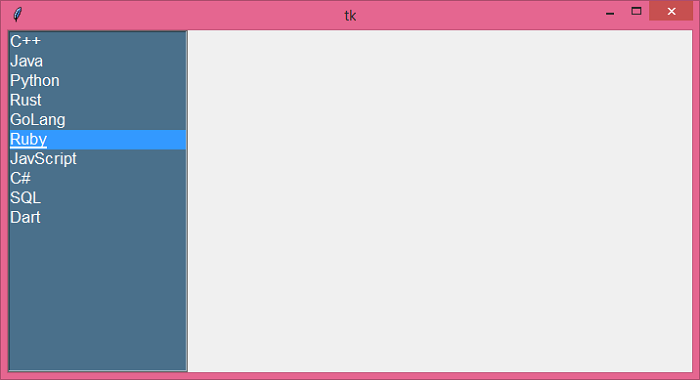
运行以上代码将显示一个自定义 Listbox 及其包含的一些列表项。

更新于: 18-6-2021
3 千次+ 浏览

广告