
 数据结构
数据结构 网络
网络 RDBMS
RDBMS 操作系统
操作系统 Java
Java MS Excel
 iOS
iOS HTML
HTML CSS
CSS Android
 Python
 C 编程
C 编程 C++
C++ C#
C# MongoDB
 MySQL
MySQL Javascript
 PHP
PHP 物理
物理 化学
化学 生物
生物 数学
数学 英语
英语 经济学
经济学 心理学
心理学 社会学
社会学 服饰研究
服饰研究 法学
法学如何在 Tkinter 中获得单选按钮输出?
Tkinter 中的单选按钮小部件允许用户仅从给定选项中选择一个选项。单选按钮只有两个值,真或假。
如果我们想要获得输出以检查用户已经选择了哪个选项,那么我们可以使用 get() 方法。它返回定义为变量的对象。我们可以通过将整数值强制转换为字符串对象并在文本属性中传递它,在标签小部件中显示选择。
示例
# Import the required libraries
from tkinter import *
from tkinter import ttk

# Create an instance of tkinter frame or window
win = Tk()

# Set the size of the window
win.geometry("700x350")

# Define a function to get the output for selected option
def selection():
   selected = "You selected the option " + str(radio.get())
   label.config(text=selected)

radio = IntVar()
Label(text="Your Favourite programming language:", font=('Aerial 11')).pack()

# Define radiobutton for each options
r1 = Radiobutton(win, text="C++", variable=radio, value=1, command=selection)

r1.pack(anchor=N)
r2 = Radiobutton(win, text="Python", variable=radio, value=2, command=selection)

r2.pack(anchor=N)
r3 = Radiobutton(win, text="Java", variable=radio, value=3, command=selection)

r3.pack(anchor=N)

# Define a label widget
label = Label(win)
label.pack()

win.mainloop()
输出
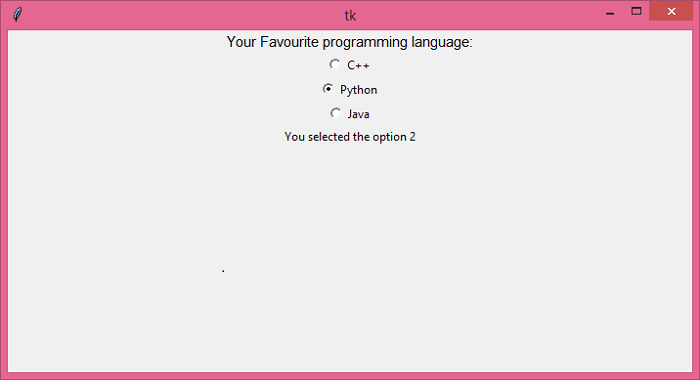
执行上述代码将显示一个窗口,其中包含一组单选按钮。单击任意选项,它将显示您已经选择的选项。

更新于: 05-Aug-2021
10K+ 浏览量

广告