
 数据结构
数据结构 网络
网络 RDBMS
RDBMS 操作系统
操作系统 Java
Java MS Excel
 iOS
iOS HTML
HTML CSS
CSS Android
 Python
 C 编程
C 编程 C++
C++ C#
C# MongoDB
 MySQL
MySQL Javascript
 PHP
PHP 物理学
物理学 化学
化学 生物学
生物学 数学
数学 英语
英语 经济学
经济学 心理学
心理学 社会学
社会学 时尚学
时尚学 法律研究
法律研究如何在 Selenium 中处理 Chrome 通知?
我们可以在 Selenium webdriver 中处理 Chrome 通知。这些通知通常称为 web 推送通知,可以通过 ChromeOptions 类的帮助进行处理。下图显示了来自浏览器 Chrome 的通知 -
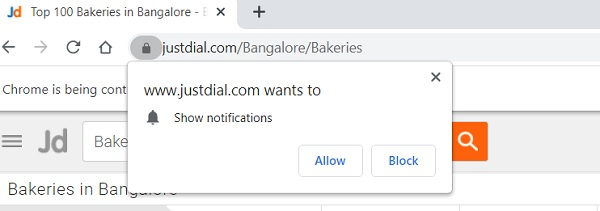
我们必须创建这个 ChromeOptions 类的对象,并在其上应用 addArguments 方法。参数 --disable-notifications 被传递为该方法的参数。最后,这些信息被发送到 ChromeDriver。
语法
ChromeOptions o = new ChromeOptions();
o.addArguments("--disable-notifications");
示例
import org.openqa.selenium.By;
import org.openqa.selenium.chrome.ChromeDriver;
import org.openqa.selenium.chrome.ChromeOptions;
import org.openqa.selenium.WebDriver;
public class NotificationChrome {
   public static void main(String[] args) throws IOException {
      //object of ChromeOptions
      ChromeOptions o = new ChromeOptions();

      //set browser options o.addArguments("--disable-notifications");
      System.setProperty("webdriver.chrome.driver",
         "C:\Users\ghs6kor\Desktop\Java\chromedriver.exe");
      // pass browser option to webdriver
      WebDriver driver = new ChromeDriver(o);
      //implicit wait
      driver.manage().timeouts().implicitlyWait(5, TimeUnit.SECONDS);
      //URL launch
      driver.get("https://www.justdial.com/Bangalore/Bakeries");
   }
}
输出


更新于: 08-Apr-2021
5000+ 浏览量

广告