
 数据结构
数据结构 网络
网络 RDBMS
RDBMS 操作系统
操作系统 Java
Java MS Excel
 iOS
iOS HTML
HTML CSS
CSS Android
 Python
 C 编程
C 编程 C++
C++ C#
C# MongoDB
 MySQL
MySQL Javascript
 PHP
PHP 物理
物理 化学
化学 生物
生物 数学
数学 英语
英语 经济学
经济学 心理学
心理学 社会科学
社会科学 时尚研究
时尚研究 法律研究
法律研究如何在 Tkinter 中使一个按钮既有图像又有文字?
我们可以使用 PhotoImage(图像位置) 函数在 Tkinter 应用程序中加载图像,此函数将图像位置作为参数并将图像显示在窗口对象上。但是,当我们尝试将图像添加到按钮时,它通常会出现在按钮上,同时隐藏按钮文本。因此,为了使按钮文本和图片相对于彼此,我们通常使用 compound 属性。它采用四个位置参数之一 - 左、右、上和下,每个参数都定义图像在按钮上的位置。
示例
在此示例中,我们使用此 图像 将其与按钮相关联。
#Import tkinter library
from tkinter import *
from PIL import Image,ImageTk
#Create an instance of Tkinter frame or window
win= Tk()
#Set the geometry of tkinter frame
win.geometry("750x250")
#Define a function to close the window
def close_win():
   win.destroy()
#Load the image
image = Image.open('preview.png')
#Resize the Image
image = image.resize((50,50), Image.ANTIALIAS)
#Convert the image to PhotoImage
img= ImageTk.PhotoImage(image)
#Create a Label
Label(win, text="Click the below button to close the window",font=('Aerial 15 bold')).pack(pady=20)
#Create a label with the image
button= Button(win, text="Click Me",font= ('Helvetica 15 bold'),image=img, compound= LEFT, command=close_win)
button.pack()
win.mainloop()
输出
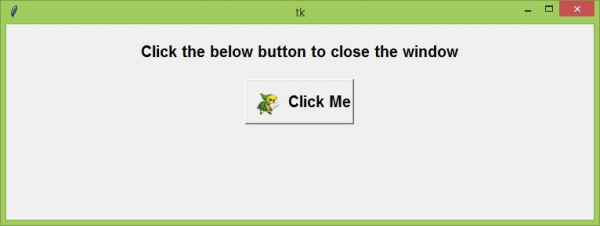
以上代码将显示一个窗口,其中包含一个带有图像和文本标签的按钮。当我们单击按钮时,它将关闭该窗口。

更新于: 2021 年 4 月 22 日
6 千次浏览

广告