
 数据结构
数据结构 网络
网络 关系型数据库管理系统
 操作系统
操作系统 Java
Java MS Excel
 iOS
iOS HTML
HTML CSS
CSS Android
 Python
 C 编程
C 编程 C++
C++ C#
C# MongoDB
 MySQL
MySQL JavaScript
 PHP
PHP 物理
物理 化学
化学 生物
生物 数学
数学 英语
英语 经济学
经济学 心理学
心理学 社会学
社会学 时装研究
时装研究 法律研究
法律研究如何在 Java 9 中使用 JavaFX 实现 JShell?\n
JShell 是一种交互式工具,用于实现示例表达式。我们可以使用JavaFX 应用程序以编程方式实现 JShell,然后我们需要在下面列出的 java 程序中导入一些包
import jdk.jshell.JShell;
import jdk.jshell.SnippetEvent;
import jdk.jshell.VarSnippet;
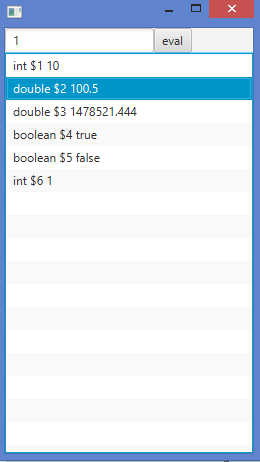
在下面的示例中,实现了一个示例 Java FX 应用程序。我们将在文本域中输入不同的值,然后按“eval”按钮。它将在列表中显示具有相应数据类型的值。
示例
import javafx.application.Application;
import javafx.scene.Scene;
import javafx.scene.control.*;
import javafx.scene.layout.*;
import javafx.stage.Stage;
import java.util.List;
import jdk.jshell.JShell;
import jdk.jshell.SnippetEvent;
import jdk.jshell.VarSnippet;

public class JShellFXTest extends Application {
   @Override
   public void start(Stage primaryStage) throws Exception {
      JShell shell = JShell.builder().build();
      TextField textField = new TextField();
      Button evalButton = new Button("eval");
      ListView<String> listView = new ListView<>();

      evalButton.setOnAction(e -> {
         List<SnippetEvent> events = shell.eval(textField.getText());
         events.stream().map(event -> convert(event)).filter(s -> s != null).forEach(s -> listView.getItems().add(s));
      });
      BorderPane pane = new BorderPane();
      pane.setTop(new HBox(textField, evalButton));
      pane.setCenter(listView);
      Scene scene = new Scene(pane);
      primaryStage.setScene(scene);
      primaryStage.show();
   }
   public static String convert(SnippetEvent e) {
      if(e.snippet() instanceof VarSnippet) {
         return ((VarSnippet) e.snippet()).typeName() + " " + ((VarSnippet) e.snippet()).name() + " " + e.value();
      }
      return null;
   }
   public static void main(String[] args) {
      launch();
   }
}
输出

更新日期: 2020 年 5 月 2 日
202 次浏览

广告