
 数据结构
数据结构 网络
网络 关系数据库管理系统 (RDBMS)
 操作系统
操作系统 Java
Java MS Excel
 iOS
iOS HTML
HTML CSS
CSS Android
 Python
 C语言编程
C语言编程 C++
C++ C#
C# MongoDB
 MySQL
MySQL Javascript
 PHP
PHP 物理学
物理学 化学
化学 生物学
生物学 数学
数学 英语
英语 经济学
经济学 心理学
心理学 社会学
社会学 服装学
服装学 法学
法学如何在Selenium中通过部分ID匹配定位元素?
我们可以使用Selenium webdriver通过部分ID匹配来定位元素。在使用xpath或css定位器识别元素时,可以实现这一点。在css和xpath表达式中,我们使用正则表达式来部分匹配ID。
让我们看一下HTML代码中元素的ID。id属性值为**gsc-i-id1**。
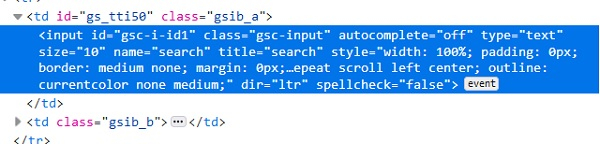
使用css表达式,我们可以使用*并对ID进行部分匹配。css值为**input[id*='id']**。这意味着子文本**id**存在于实际文本**gsc-i-id1**中。我们也可以使用**^**并对ID进行匹配。css值为**input[id^='gsc']**。这意味着实际文本**gsc-i-id1**以子文本**gsc**开头。我们也可以使用**$**并对ID进行匹配。css值为**input[id$='id1']**。这意味着实际文本**gsc-i-id1**以子文本**id1**结尾。
使用xpath表达式,我们可以使用**contains()**方法并对ID进行部分匹配。xpath值为**//*[contains(@id, 'id')]**。这意味着子文本id存在于实际文本**gsc-i-id1**中。我们也可以使用**starts-with()**并对ID进行匹配。css值为**//*[starts-with(@id, 'gsc')]**。这意味着实际文本**gsc-i-id1**以子文本gsc开头。我们也可以使用**ends-with()**并对ID进行匹配。css值为**//*[endswith(@id, 'id1')]**。这意味着实际文本**gsc-i-id1**以子文本**id1**结尾。
示例
代码实现。
import org.openqa.selenium.WebDriver;
import org.openqa.selenium.chrome.ChromeDriver;
import org.openqa.selenium.WebElement;
import org.openqa.selenium.By;
public class PartialMatchId{
   public static void main(String[] args) {
      System.setProperty("webdriver.chrome.driver", "C:\Users\ghs6kor\Desktop\Java\chromedriver.exe");
      WebDriver driver = new ChromeDriver();
      driver.get("https://tutorialspoint.com/about/about_careers.htm");
      // identify element with partial id match with * in css
      WebElement l=driver.findElement(By.cssSelector("input[id*='id']"));
      l.sendKeys("Selenium");
      // obtain the value entered with getAttribute method
      System.out.println("Using * expression: " +l.getAttribute("value"));
      l.clear();
      // identify element with partial id match with ^ in css
      WebElement m=driver.findElement(By.cssSelector("input[id^='gsc']"));
      m.sendKeys("Java");
      // obtain the value entered with getAttribute method
      System.out.println("Using ^ expression: " +m.getAttribute("value"));
      m.clear();
      // identify element with partial id match with $ in css
      WebElement n = driver.findElement(By.cssSelector("input[id$='id1']"));
      n.sendKeys("Python");
      // obtain the value entered with getAttribute method
      System.out.println("Using $ expression: " +n.getAttribute("value"));
      n.clear();
      // identify element with partial id match with contains in xpath
      WebElement o=driver.findElement(By.xpath("//input[contains(@id,'id')]"));
      o.sendKeys("Selenium");
      // obtain the value entered with getAttribute method
      System.out.println("Using contains: " +o.getAttribute("value"));
      o.clear();
      // identify element with partial id match with starts-with in xpath
      WebElement p=driver.findElement(By.xpath("//input[starts-with(@id,'gsc')]"));
      p.sendKeys("Java");
      // obtain the value entered with getAttribute method
      System.out.println("Using starts-with: " +p.getAttribute("value"));
      p.clear();
      driver.close();
   }
}
输出


更新于:2020年10月26日
9K+ 次浏览

广告