
 数据结构
数据结构 网络
网络 RDBMS
RDBMS 操作系统
操作系统 Java
Java MS Excel
 iOS
iOS HTML
HTML CSS
CSS Android
 Python
 C 编程
C 编程 C++
C++ C#
C# MongoDB
 MySQL
MySQL Javascript
 PHP
PHP 物理
物理 化学
化学 生物
生物 数学
数学 英语
英语 经济学
经济学 心理学
心理学 社会研究
社会研究 时尚研究
时尚研究 法律研究
法律研究如何将目录下的所有 Excel 文件读取为 Pandas DataFrame?
若要读取目录中的所有 Excel 文件,请使用 Glob 模块和 read_excel() 方法。
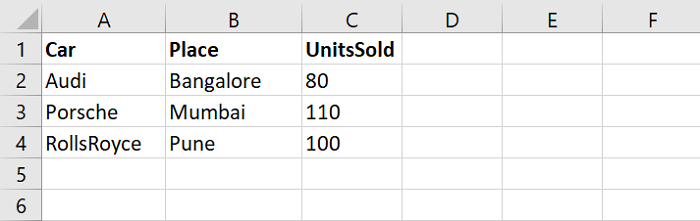
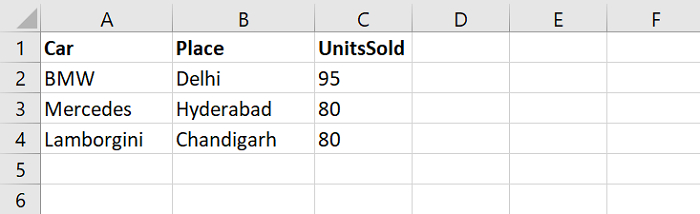
假设目录中包含以下 Excel 文件 −
Sales1.xlsx
Sales2.xlsx
首先,设置包含所有 Excel 文件的路径。获取 Excel 文件并使用 glob 读取它们 −
path = "C:\Users\amit_\Desktop\"

filenames = glob.glob(path + "\*.xlsx")
print('File names:', filenames)
接下来,使用 for 循环迭代并在特定目录中读取所有 Excel 文件。我们还在使用 read_excel() −
for file in filenames:
   print("Reading file = ",file)
   print(pd.read_excel(file))
示例
以下是完整的代码 −
import pandas as pd
import glob

# getting excel files from Directory Desktop
path = "C:\Users\amit_\Desktop\"

# read all the files with extension .xlsx i.e. excel
filenames = glob.glob(path + "\*.xlsx")
print('File names:', filenames)

# for loop to iterate all excel files
for file in filenames:
   # reading excel files
   print("Reading file = ",file)
   print(pd.read_excel(file))
输出
此代码将生成以下输出 −
File names:['C:\Users\amit_\Desktop\Sales1.xlsx','C:\Users\amit_\Desktop\Sales2.xlsx']

Reading file = C:\Users\amit_\Desktop\Sales1.xlsx
          Car      Place   UnitsSold
0        Audi  Bangalore          80
1     Porsche     Mumbai         110
2  RollsRoyce       Pune         100

Reading file = C:\Users\amit_\Desktop\Sales2.xlsx
          Car      Place   UnitsSold
0         BMW      Delhi         95
1    Mercedes  Hyderabad         80
2  Lamborgini Chandigarh         80

更新于: 2021 年 9 月 27 日
11K+ 浏览量

广告