
 数据结构
数据结构 网络
网络 RDBMS
RDBMS 操作系统
操作系统 Java
Java MS Excel
 iOS
iOS HTML
HTML CSS
CSS Android
 Python
 C 编程
C 编程 C++
C++ C#
C# MongoDB
 MySQL
MySQL Javascript
 PHP
PHP 物理学
物理学 化学
化学 生物学
生物学 数学
数学 英语
英语 经济学
经济学 心理学
心理学 社会研究
社会研究 时尚研究
时尚研究 法律研究
法律研究如何在 Selenium 中解决元素不可交互异常?
我们可以用 Selenium webdriver 来解决异常 – ElementNotInteractableException。如果 Web 元素存在于 DOM 中但无法访问,就会抛出此异常。下图显示了此类异常的一个示例。
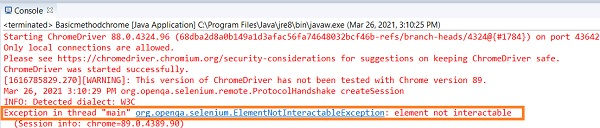
如果特定 Web 元素被另一个 Web 元素覆盖,我们通常会得到此异常。为了修复此问题,我们可以应用显式等待,以便 WebDriver 等待预期条件 - 覆盖 Web 元素的 overlaying webelement 的不可见性。
或者,我们可以在我们要与其进行交互的 Web 元素上应用预期条件 - elementToBeClickable。要解决永久覆盖,我们必须使用 JavaScript 执行器来执行单击操作。Selenium 利用 executeScript 方法来运行 JavaScript 命令。
语法
WebDriverWait wait= (new WebDriverWait(driver, 5));
wait.until(ExpectedConditions . elementToBeClickable (By.id("element id")));
//alternate solution
wait.until(ExpectedConditions. invisibilityOfElementLocated(By.id("overlay element id")));
//fix with JavaScript executor
WebElement m = driver.findElement(By.id("element id"));
JavascriptExecutor jse = (JavascriptExecutor) driver;
jse.executeScript("arguments[0].click();", m);
示例
import org.openqa.selenium.By;
import org.openqa.selenium.WebDriver;
import org.openqa.selenium.WebElement;
import org.openqa.selenium.chrome.ChromeDriver;
import org.openqa.selenium.JavascriptExecutor;
public class InteractableExceptResolve{
   public static void main(String[] args) {
      System.setProperty("webdriver.chrome.driver", "C:\Users\ghs6kor\Desktop\Java\chromedriver.exe");
      WebDriver driver = new ChromeDriver();
      //launch URL
      driver.get("https://login.yahoo.com/");
      //identify element
      WebElement m = driver.findElement(By.xpath("//input[@id='persistent']"));
      //JavascriptExecutor to click element
      JavascriptExecutor jse = (JavascriptExecutor) driver;
      jse.executeScript("arguments[0].click();", m);
      boolean b = m.isSelected();
      if (b) {
         System.out.println("Checkbox is not checked");
      }else {
         System.out.println("Checkbox is checked");
      }
      driver.close();
   }
}
输出


更新于:22-Oct-2023
24K+ 次浏览

广告