
 数据结构
数据结构 网络
网络 RDBMS
RDBMS 操作系统
操作系统 Java
Java MS Excel
 iOS
iOS HTML
HTML CSS
CSS Android
 Python
 C 编程
C 编程 C++
C++ C#
C# MongoDB
 MySQL
MySQL Javascript
 PHP
PHP 物理
物理 化学
化学 生物
生物 数学
数学 英语
英语 经济学
经济学 心理学
心理学 社会学
社会学 时尚设计
时尚设计 法律
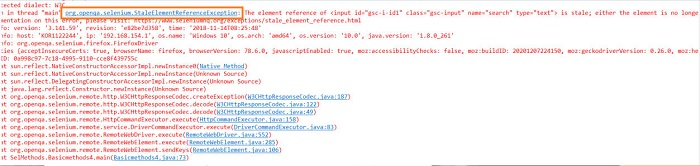
法律什么是 Selenium Webdriver 中的陈旧元素引用异常,以及如何修复它?
在使用 Selenium webdriver 时,我们可能会遇到陈旧元素引用异常。我们可以修复 Selenium webdriver 中的陈旧元素引用异常。陈旧一词表示不再新鲜且已经腐朽。因此,陈旧元素指向的元素不再存在。
在如下情况下可能会出现异常:元素最初在 DOM 中存在,但在文档对象模型 (DOM) 发生修改后,该元素变为陈旧,若我们尝试访问此元素,则会抛出陈旧元素引用异常。
当元素不再存在于 DOM 中或被删除时,会导致此异常。我们可以通过以下方法来处理此异常:
- 刷新页面并重新验证。
- 实现重试方法。
示例 1
为了说明陈旧元素引用异常,实现代码。
import org.openqa.selenium.By;
import org.openqa.selenium.WebDriver;
import org.openqa.selenium.WebElement;
import org.openqa.selenium.chrome.ChromeDriver;
import java.util.concurrent.TimeUnit;
public class StaleElmnt{
   public static void main(String[] args) {
      System.setProperty("webdriver.chrome.driver", "C:\Users\ghs6kor\Desktop\Java\chromedriver.exe");
      WebDriver driver = new ChromeDriver();

      //implicit wait
      driver.manage().timeouts().implicitlyWait(5, TimeUnit.SECONDS);

      //application launch
      driver.get("https://tutorialspoint.com/about/about_careers.htm");

      // identify element
      WebElement l = driver.findElement(By.id("gsc-i-id1"));

      //enter text
      l.sendKeys("Selenium");

      //refresh page
      driver.navigate().refresh();

      //again enter text
      l.sendKeys("Selenium");

      //browser quit
      driver.quit();
   }
}
输出
示例 2
为了修复陈旧元素引用异常,实现代码。
import org.openqa.selenium.By;
import org.openqa.selenium.WebDriver;
import org.openqa.selenium.WebElement;
import org.openqa.selenium.chrome.ChromeDriver;
import java.util.concurrent.TimeUnit;
import org.openqa.selenium.StaleElementReferenceException;
public class StaleElmntFix{
   public static void main(String[] args) {
      System.setProperty("webdriver.chrome.driver", "C:\Users\ghs6kor\Desktop\Java\chromedriver.exe");
      WebDriver driver = new ChromeDriver();

      //implicit wait
      driver.manage().timeouts().implicitlyWait(5, TimeUnit.SECONDS);

      //application launch
      driver.get("https://tutorialspoint.com/about/about_careers.htm");

      // identify element
      WebElement l = driver.findElement(By.id("gsc-i-id1"));

      //enter text
      l.sendKeys("Selenium");

      //refresh page
      driver.navigate().refresh();

      //fix exception with try-catch block
      try{
         l.sendKeys("Selenium");
      }
      catch(StaleElementReferenceException e){
         l = driver.findElement(By.id("gsc-i-id1"));
         l.sendKeys("Selenium");

         //obtain value entered
         String s= l.getAttribute("value");
         System.out.println("Value entered is: " +s);
      }
      driver.quit();
   }
}
输出


更新时间: 2021 年 11 月 18 日
超过 1000 次浏览

广告