
 数据结构
数据结构 网络
网络 关系数据库管理系统 (RDBMS)
 操作系统
操作系统 Java
Java MS Excel
 iOS
iOS HTML
HTML CSS
CSS Android
 Python
 C 编程
C 编程 C++
C++ C#
C# MongoDB
 MySQL
MySQL Javascript
 PHP
PHP 物理
物理 化学
化学 生物
生物 数学
数学 英语
英语 经济学
经济学 心理学
心理学 社会学
社会学 时尚研究
时尚研究 法学研究
法学研究如何在 iOS 应用中后台运行计时器
如果您希望在 iOS 应用程序中后台运行计时器,Apple 提供了 beginBackgroundTaskWithExpirationHandler 方法,您可以阅读更多相关信息 https://developer.apple.com/documentation/uikit/uiapplication/1623031-beginbackgroundtaskwithexpiration。
我们将使用相同的 method 来编写我们在后台运行计时器的代码。
让我们开始吧。
步骤 1 - 打开 Xcode → 单视图应用程序 → 我们将其命名为 BackgroundTimer。
步骤 2 - 打开 AppDelegate.swift,并在 applicationDidEnterBackground 方法下编写以下代码。
backgroundTaskIdentifier = UIApplication.shared.beginBackgroundTask(expirationHandler: {
   UIApplication.shared.endBackgroundTask(self.backgroundTaskIdentifier!)
})
_ = Timer.scheduledTimer(timeInterval: 1, target: self, selector: #selector(self.doSomething), userInfo: nil, repeats: true)
步骤 3 - 编写新的函数 doSomething()
@objc func doSomething() {
   print("I'm running")
}
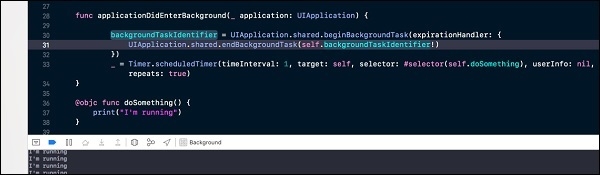
最终您的代码应如下所示
func applicationDidEnterBackground(_ application: UIApplication) {
   backgroundTaskIdentifier = UIApplication.shared.beginBackgroundTask(expirationHandler: {
      UIApplication.shared.endBackgroundTask(self.backgroundTaskIdentifier!)
   })
   _ = Timer.scheduledTimer(timeInterval: 1, target: self, selector: #selector(self.doSomething), userInfo: nil, repeats: true)
}
@objc func doSomething() {
   print("I'm running")
}
运行应用程序
当应用程序转到后台时,我们在这里打印“我正在运行”。当应用程序进入后台时,“我正在运行”将开始在控制台中打印。点击主页按钮并进行测试。但是,根据 Apple 文档的规定并经过测试,当您的应用程序处于后台时,您可以最多运行计时器 3 分钟。
运行此应用程序时,将应用程序置于后台并等待 3 分钟,您会看到 3 分钟后“我正在运行”不会打印。现在将应用程序置于前台,您会注意到“我正在运行”开始打印。

更新于:2019年7月30日
浏览量 1000+

广告