
 数据结构
数据结构 网络
网络 RDBMS
RDBMS 操作系统
操作系统 Java
Java MS Excel
 iOS
iOS HTML
HTML CSS
CSS Android
 Python
 C 编程
C 编程 C++
C++ C#
C# MongoDB
 MySQL
MySQL Javascript
 PHP
PHP 物理学
物理学 化学
化学 生物学
生物学 数学
数学 英语
英语 经济学
经济学 心理学
心理学 社会学
社会学 时尚设计
时尚设计 法学
法学如何在没有 GUI 的情况下运行 Selenium(Firefox)WebDriver?
我们可以在没有 GUI 的情况下运行 Selenium(Firefox)WebDriver。这意味着必须以**无界面 **模式启动执行。现在无界面执行非常流行,因为它可以减少资源消耗。
设置**geckodriver **路径后,可以在没有 GUI 的情况下执行 Firefox。我们需要借助**FirefoxOptions **类,通过**setHeadless **方法将此信息分享给浏览器。最后,将**true **作为参数传递给它。
语法
FirefoxOptions op = new FirefoxOptions();
op.setHeadless(true);
WebDriver driver = new FirefoxDriver(op);
示例
代码实现。
import org.openqa.selenium.WebDriver;
import org.openqa.selenium.WebElement;
import org.openqa.selenium.firefox.FirefoxDriver;
import org.openqa.selenium.firefox.FirefoxOptions;
import java.util.concurrent.TimeUnit;
public class FirefoxNoGUI{
   public static void main(String[] args) {
      System.setProperty("webdriver.gecko.driver", "C:\Users\ghs6kor\Desktop\Java\geckodriver.exe");
      //FirefoxOptions object
      FirefoxOptions op = new FirefoxOptions();
      //pass true to headless mode
      op.setHeadless(true);
      // send headless information to Firefox driver
      WebDriver driver = new FirefoxDriver(op);
      // wait of 5 seconds
      driver.manage().timeouts().implicitlyWait(5, TimeUnit.SECONDS);
      driver.get("https://tutorialspoint.com/about/about_careers.htm");
      // get page title
      System.out.println("Page Title without GUI: " + driver.getTitle());
      driver.quit();
   }
}
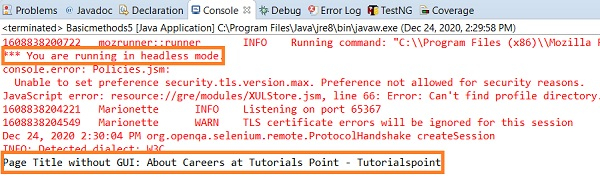
输出

更新于: 2020 年 12 月 28 日
1K+ 人次浏览

广告