
 数据结构
数据结构 网络
网络 关系型数据库管理系统
 操作系统
操作系统 Java
Java MS Excel
 iOS
iOS HTML
HTML CSS
CSS Android
 Python
 C 编程
C 编程 C++
C++ C#
C# MongoDB
 MySQL
MySQL Javascript
 PHP
PHP 物理
物理 化学
化学 生物
生物 数学
数学 英语
英语 经济学
经济学 心理学
心理学 社会学
社会学 时尚研究
时尚研究 法律研究
法律研究如何在 C# 中设置 CheckBox 中复选标记的对齐方式?
在图形用户界面中,C# 中的 CheckBox 控件允许用户选择真/假或是/否选项。CheckBox 控件中的复选标记通常位于左侧对齐,但在某些情况下,您可能希望将其移动到中心或右侧。
CheckBox 中复选标记的对齐方式
TextAlign 属性
要设置 CheckBox 控件中复选标记的对齐方式,需要使用 TextAlign 属性。TextAlign 属性是一个枚举,允许您设置控件内文本和复选标记的水平对齐方式。
语法
更改复选标记对齐方式的语法如下:
checkBox1.TextAlign = ContentAlignment.MiddleRight;
Left − 将文本和复选标记与控件的左边缘对齐。
Right − 将文本和复选标记与控件的右边缘对齐。
Center − 将文本和复选标记与控件的中心对齐。
示例
以下程序将复选标记对齐到复选框控件的右侧
算法
步骤 1 − 创建一个表单。
步骤 2 − 加载表单以将其显示在屏幕上。
步骤 3 − 将复选框插入表单,然后在复选框中创建复选标记。在此步骤中,指定复选框的高度和宽度。此外,您还可以设置复选框的位置。
步骤 4 − 将复选标记对齐到复选框的右侧。为此,我们将使用 checkalign 属性并将其设置为 middleright,以便复选框与表单的右侧对齐。
public partial class Form1 : Form {     //start creating the form
   public Form1()  {   //form 1 is created on this line
      InitializeComponent();    //initialize form 1 components
   }
   private void Form1_Load(object sender, EventArgs e) { //code to load form

      // Creating and setting the properties of label
      Label a = new Label();  //create new label for form
      a.Text = "Select fruit:"; //text shown on label
      a.Location = new Point(233, 111); //location to show label on form

      // Adding label to form
      this.Controls.Add(a);

      // Creating and setting the properties of CheckBox
      CheckBox acheckbox = new CheckBox();  //create first checkbox
      acheckbox.Height = 70;   //customize height of checkbox
      acheckbox.Width = 150;   //customize width of checkbox
      acheckbox.Location = new Point(229, 136);// set location of checkbox on form
      acheckbox.Text = "Orange";  //text to show on checkbox
      //set checkbox alignment to middleright
      acheckbox.CheckAlign = ContentAlignment.Middleright;

      // Adding checkbox to form
      this.Controls.Add(acheckbox);

      // Creating and setting the properties of CheckBox
      CheckBox zcheckbox = new CheckBox();//create second checkbox
      zcheckbox.Height = 70;  //set height of second checkbox
      zcheckbox.Width = 150;  //set width of second checkbox
      //set location of checkbox on form
      zcheckbox.Location = new Point(230, 174);
      zcheckbox.Text = "Mango";  //text to show on checkbox
      //set checkbox alignment to Middleright
      zcheckbox.CheckAlign = ContentAlignment.MiddleRight;

      // Adding checkbox to form
      this.Controls.Add(zcheckbox);
   }
}
输出
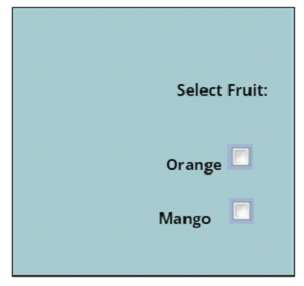
结论
在本文中讨论的示例中,复选框控件的 TextAlign 属性设置为 mddleRight,并且文本设置为中间右侧对齐。除了使用编码技术之外,您还可以使用属性窗口在 Visual Studio 中设置复选框对齐方式。
要在 Visual Studio 中更改对齐方式,请在表单设计器中选择 CheckBox 控件,打开“属性”窗口,单击“TextAlign”属性,然后从下拉列表中选择对齐方式。
这些属性还允许您自定义复选框控件的布局,例如宽度、高度等。最后,在 C# 中调整 CheckBox 控件中复选标记的对齐方式非常简单。您可以使用 TextAlign 属性或更改控件的布局来更改 CheckBox 控件的外观和功能,以满足应用程序的需求。

374 次查看
