
 数据结构
数据结构 网络
网络 关系型数据库管理系统
 操作系统
操作系统 Java
Java MS Excel
 iOS
iOS HTML
HTML CSS
CSS Android
 Python
 C 编程
C 编程 C++
C++ C#
C# MongoDB
 MySQL
MySQL Javascript
 PHP
PHP 物理学
物理学 化学
化学 生物学
生物学 数学
数学 英语
英语 经济学
经济学 心理学
心理学 社会学
社会学 时尚研究
时尚研究 法律研究
法律研究如何在 Ubuntu 上设置 Shiny Server
Shiny 是一个 R 包,允许 Linux 用户将 R 代码转换为交互式网页并在网上发布文档。您可以获取您的 Shiny 应用程序并在您的组织或全球范围内共享。本文介绍了如何在 Ubuntu 上设置 Shiny Server。
在 Ubuntu 上安装 Shiny Server
在安装 Shiny Server 之前,我们需要安装 shiny R 包。要安装 R 包,请使用以下命令 -
$ sudo apt-get install r-base
示例输出应如下所示 -
Reading package lists... Done
Building dependency tree
Reading state information... Done
The following packages were automatically installed and are no longer required:
apport-hooks-elementary contractor javascript-common libgda-5.0-4 libgda-5.0-common libgranite-common libgranite3 libgsignon-glib1
libindicate5 libjs-jquery libnoise-core0 libtagc0 mysql-server-5.7 mysql-server-core-5.7
Use 'sudo apt autoremove' to remove them.
The following additional packages will be installed:
bzip2-doc cdbs debhelper dh-strip-nondeterminism dh-translations gfortran gfortran-5 intltool libblas-common libblas-dev libblas3 libbz2-dev
libfile-stripnondeterminism-perl libgfortran-5-dev libgfortran3 liblapack-dev liblapack3 liblzma-dev liblzma5 libmail-sendmail-perl
libncurses5-dev libpcre3-dev libpcre32-3 libpcrecpp0v5 libpng12-dev libreadline-dev libreadline6-dev libsys-hostname-long-perl libtinfo-dev
po-debconf python-scour python-six r-base-core r-base-dev r-base-html r-cran-boot r-cran-class r-cran-cluster r-cran-codetools
r-cran-foreign r-cran-kernsmooth r-cran-lattice r-cran-mass r-cran-matrix r-cran-mgcv r-cran-nlme r-cran-nnet r-cran-rpart r-cran-spatial
r-cran-survival r-doc-html r-recommended
.......................................................................
我们将使用 GDebi 工具安装 Shiny Server。要安装 GDebi,请使用以下命令 -
$ sudo apt-get install gdebi-core
示例输出应如下所示 –
Reading package lists... Done
Building dependency tree
Reading state information... Done
The following packages were automatically installed and are no longer required:
apport-hooks-elementary contractor javascript-common libgda-5.0-4 libgda-5.0-common libgranite-common libgranite3 libgsignon-glib1
libindicate5 libjs-jquery libnoise-core0 libtagc0 mysql-server-5.7 mysql-server-core-5.7
Use 'sudo apt autoremove' to remove them.
The following NEW packages will be installed:
gdebi-core
0 upgraded, 1 newly installed, 0 to remove and 180 not upgraded.
Need to get 9,716 B of archives.
After this operation, 135 kB of additional disk space will be used.
Get:1 http://in.archive.ubuntu.com/ubuntu xenial/main amd64 gdebi-core all 0.9.5.7ubuntu1 [9,716 B]
Fetched 9,716 B in 0s (31.5 kB/s)
Selecting previously unselected package gdebi-core.
(Reading database ... 189573 files and directories currently installed.)
Preparing to unpack .../gdebi-core_0.9.5.7ubuntu1_all.deb ...
Unpacking gdebi-core (0.9.5.7ubuntu1) ...
Processing triggers for man-db (2.7.5-1) ...
Setting up gdebi-core (0.9.5.7ubuntu1) ...
...........................................................................................
要下载 Shiny Server,请使用以下命令 -
$ wget https://download3.rstudio.org/ubuntu-12.04/x86_64/shiny-server-1.4.2.786-amd64.deb
示例输出应如下所示 –
--2016-05-16 11:38:20-- https://download3.rstudio.org/ubuntu-12.04/x86_64/shiny-server-1.4.2.786-amd64.deb
Resolving download3.rstudio.org (download3.rstudio.org)... 54.230.190.35, 54.230.190.248, 54.230.190.84, ...
Connecting to download3.rstudio.org (download3.rstudio.org)|54.230.190.35|:443... connected.
HTTP request sent, awaiting response... 200 OK
Length: 53653388 (51M) [application/octet-stream]
Saving to: ‘shiny-server-1.4.2.786-amd64.deb’

shiny-server-1.4.2.786-amd64.deb 100%[===================================================================>] 51.17M 408KB/s in 2m 26s

2016-05-16 11:40:48 (358 KB/s) - ‘shiny-server-1.4.2.786-amd64.deb’ saved [53653388/53653388]
现在使用 GDebi 安装使用以下命令下载的文件 -
$ sudo gdebi shiny-server-1.4.2.786-amd64.deb
示例输出应如下所示 –
Reading package lists... Done
Building dependency tree
Reading state information... Done
Reading state information... Done

Shiny Server
Shiny Server is a server program from RStudio, Inc. that makes Shiny applications available over the web. Shiny is a web application framework for the R statistical computation language.
Do you want to install the software package? [y/N]:y
Selecting previously unselected package shiny-server.
(Reading database ... 189587 files and directories currently installed.)
Preparing to unpack shiny-server-1.4.2.786-amd64.deb ...
Unpacking shiny-server (1.4.2.786) ...
Setting up shiny-server (1.4.2.786) ...
Creating user shiny
Adding LANG to /etc/systemd/system/shiny-server.service, setting to en_IN
Created symlink from /etc/systemd/system/multi-user.target.wants/shiny-server.service to /etc/systemd/system/shiny-server.service.
shiny-server.service - ShinyServer
Loaded: loaded (/etc/systemd/system/shiny-server.service; enabled; vendor preset: enabled)
Active: active (running) since Mon 2016-05-16 11:42:45 IST; 36ms ago
Process: 1583 ExecStartPost=/bin/sleep 3 (code=exited, status=0/SUCCESS)
Main PID: 1584 (shiny-server)
Tasks: 8 (limit: 512)
CGroup: /system.slice/shiny-server.service
      ├─1582 /bin/bash -c /opt/shiny-server/bin/shiny-server --pidfile=/var/run/shiny-server.pid >>                   /var/log/shiny-server.log 2>&1
      └─1584 /opt/shiny-server/ext/node/bin/shiny-server /opt/shiny-server/lib/main.js --pidfile=/var/run/shiny-server.pid

May 16 11:42:42 linux systemd[1]: Starting ShinyServer...
May 16 11:42:45 linux systemd[1]: shiny-server.service: Supervising process 1584 which is not our child. We'll most likely not notice...t exits.
May 16 11:42:45 linux systemd[1]: Started ShinyServer.
Hint: Some lines were ellipsized, use -l to show in full.
Shiny Server 现在应该已安装并正在端口 3838 上运行。您应该能够在 http://your_server_ip:3838/ 上看到默认的欢迎屏幕。示例输出应如下所示 -

托管交互式 R Markdown 文档
此时,您应该有一个可以托管 Shiny 应用程序的正常运行的 Shiny Server,但它还无法托管交互式 R markdown 文档,因为 rmarkdown R 包尚未安装。Shiny Server 带有一个示例交互式文档,可在以下位置获取
Shiny Server 带有一个示例交互式文档,可在 http://your_server_ip:3838/sample-apps/rmd/ 获取。如果您现在转到该 URL,您将看到一个错误。
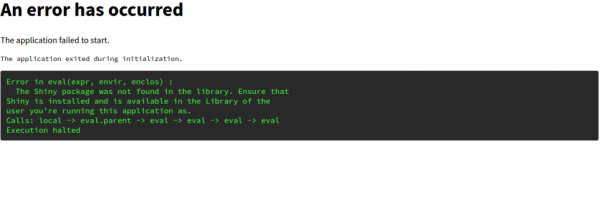
要解决上述问题,请使用以下命令 -
$ sudo su - -c "R -e \"install.packages('rmarkdown', repos='http://cran.rstudio.com/')\""示例输出应如下所示 –
R version 3.2.3 (2015-12-10) -- "Wooden Christmas-Tree"
Copyright (C) 2015 The R Foundation for Statistical Computing
Platform: x86_64-pc-linux-gnu (64-bit)

R is free software and comes with ABSOLUTELY NO WARRANTY.
You are welcome to redistribute it under certain conditions.
Type 'license()' or 'licence()' for distribution details.

Natural language support but running in an English locale

R is a collaborative project with many contributors.
...........................................................................................
现在,Shiny Server 也设置为运行交互式 R markdown 文档以及 Shiny 应用程序。要验证交互式文档的工作原理,请转到 http://your_server_ip:3838/sample-apps/rmd/。
您现在拥有一个功能齐全的 Shiny Server,可以托管 Shiny 应用程序或交互式文档。Shiny Server 的配置文件位于 /etc/shiny-server/shiny-server.conf。默认情况下,它配置为在 /srv/shiny-server/ 目录中提供服务。这意味着放置在 /srv/shiny-server/app_name 的任何 Shiny 应用程序都可以在 http://your_server_ip:3838/app_name/ 上公开访问。
阅读本文后,您将能够理解 - 如何在 Ubuntu 上设置 Shiny Server。在我们的下一篇文章中,我们将推出更多基于 Linux 的技巧和提示。继续关注!

767 次浏览
