
 数据结构
数据结构 网络
网络 RDBMS
RDBMS 操作系统
操作系统 Java
Java MS Excel
 iOS
iOS HTML
HTML CSS
CSS Android
 Python
 C 编程
C 编程 C++
C++ C#
C# MongoDB
 MySQL
MySQL Javascript
 PHP
PHP 物理
物理 化学
化学 生物学
生物学 数学
数学 英语
英语 经济学
经济学 心理学
心理学 社会科学
社会科学 法学
法学 法律研究
法律研究如何在 HTML 页面中使用动画图像?
HTML 中的动画图像是网页上会移动的一类图像。它们是 GIF 格式,即图形交换格式文件。
需要使用带有src属性的 <image> 标记,以在 HTML 中添加动画图像。src属性添加了图像的 URL(文件目标位置)。
此外,还可以使用 height 和 width 属性设置图像的高度和宽度。
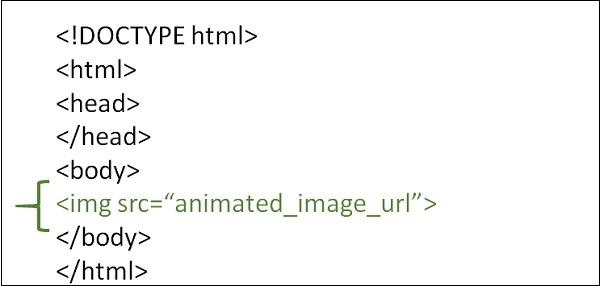
语法
<image src=”Animated image”>
示例 1
以下示例展示了如何在 HTML 网页中使用动画图像 -
<!DOCTYPE html>
<html>
<head>
   <meta charset="UTF-8">
   <meta name="description" content="meta tag in the web document">
   <meta name="keywords" content="HTML,CSS">
   <meta name="author" content="lokesh">
   <meta name="viewport" content="width=device-width, initial-scale=1.0">
</head>
<body>
   <p>Adding Animated Images to the web page</p>
   <img src="https://tutorialspoint.com/images/html.gif">
</body>
</html>
示例 2
您可以尝试运行以下代码来使用 HTML 中的动画图像 -
<!DOCTYPE html>
<html>
<head>
   <title>Animated Image</title>
</head>
<body>
   <h1>Animated Image</h1>
   <img src="https://media.giphy.com/media/3o6UBpHgaXFDNAuttm/giphy.gif">
</body>
</html>
示例 3
我们可以使用样式表更改动画图像的高度和宽度。
<!DOCTYPE html>
<html>
<head>
   <meta charset="UTF-8">
   <meta name="description" content="meta tag in the web document">
   <meta name="keywords" content="HTML,CSS">
   <meta name="author" content="lokesh">
   <meta name="viewport" content="width=device-width, initial-scale=1.0">
</head>
<body>
   <p> dding Animated Images to the web page</p>
   <img src="https://tutorialspoint.com/images/html.gif" height="200" width="200">
</body>
</html>

更新时间:2023 年 9 月 2 日
50000+ 次浏览

广告