
 数据结构
数据结构 网络
网络 RDBMS
RDBMS 操作系统
操作系统 Java
Java MS Excel
 iOS
iOS HTML
HTML CSS
CSS Android
 Python
 C 编程
C 编程 C++
C++ C#
C# MongoDB
 MySQL
MySQL JavaScript
 PHP
PHP 物理学
物理学 化学
化学 生物学
生物学 数学
数学 英语
英语 经济学
经济学 心理学
心理学 社会研究
社会研究 时装研究
时装研究 法律研究
法律研究如何在 Selenium Webdriver 中使用 Java 中的 clickandwait?
我们可以在 Selenium 中点击并等待。这可以通过同步概念实现。我们将使用显示等待条件并等待在下一步之前某个元素可点击。
显示等待在抛出异常之前等待指定时间。若要验证某个元素是否可点击,我们可以使用期望条件elementToBeClickable。
示例
代码实现。
import org.openqa.selenium.By;
import org.openqa.selenium.WebDriver;
import org.openqa.selenium.WebElement;
import org.openqa.selenium.chrome.ChromeDriver;
import java.util.concurrent.TimeUnit;
import org.openqa.selenium.support.ui.ExpectedConditions;
import org.openqa.selenium.support.ui.WebDriverWait;
public class ElementClickableWait{
   public static void main(String[] args) {
      System.setProperty("webdriver.chrome.driver",
"C:\Users\ghs6kor\Desktop\Java\chromedriver.exe");
      WebDriver driver = new ChromeDriver();
      driver.manage().timeouts().implicitlyWait(5, TimeUnit.SECONDS);
      String url = "https://tutorialspoint.com/index.htm";
      driver.get(url);
      // identify element and click()
      WebElement l=driver.findElement(By.className("mui-btn"));
      l.click();
      // explicit wait condition
      WebDriverWait w = new WebDriverWait(driver,3);
      // elementToBeClickable condition
      w.until(ExpectedConditions
      .elementToBeClickable (By.className("s-buy")));
      // get page title of next page
      System.out.println("Current page title:" + driver.getTitle());
      driver.quit();
   }
}
输出
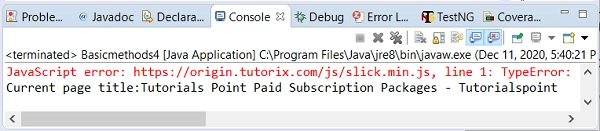

更新时间: 2020 年 12 月 28 日
2K+ 次浏览

广告