
 数据结构
数据结构 网络
网络 关系型数据库管理系统
 操作系统
操作系统 Java
Java MS Excel
 iOS
iOS HTML
HTML CSS
CSS Android
 Python
 C 编程
C 编程 C++
C++ C#
C# MongoDB
 MySQL
MySQL Javascript
 PHP
PHP 物理学
物理学 化学
化学 生物学
生物学 数学
数学 英语
英语 经济学
经济学 心理学
心理学 社会学
社会学 时尚学
时尚学 法学
法学HTML DOM AnimationEvent
HTML DOM AnimationEvent 是一个 JavaScript 对象,用于处理 CSS 动画运行时发生的事件。它主要为我们提供了与动画相关的事件信息。它通过描述触发动画的事件,为我们提供了对 CSS 动画的更大控制。它表示事件与动画之间的关系。
属性
以下为 Animation Event 的属性 −
| 属性 | 说明 |
|---|---|
| animationName | 将返回正在执行的动画的名称。 |
| elapsedTime | 返回自动画运行以来经过的时间(秒)。 |
| pseudoElement | 返回动画的伪元素名称。例如:::before、::after、::first-line 等。 |
语法
以下为 animationEvent 的语法 −
animationEvent.property
示例
让我们看一个 animationEvent 示例 −
<!DOCTYPE html>
<html>
<head>
<style>
   #ANIM-DIV {
      margin: 10px;
      width: 400px;
      height: 100px;
      background: lightgreen;
      position: relative;
      font-size: 30px;
      animation-name: animMove;
      animation-duration: 5s;
   }
   @-webkit-keyframes animMove {
      from {top: 0px;}
      to {top: 200px;}
   }
</style>
</head>
<body>
<div id="ANIM-DIV"></div>
<script>
   var x = document.getElementById("ANIM-DIV");
   x.addEventListener("animationstart", myAnimFunction);
   function myAnimFunction(event) {
      this.innerHTML = "The animation-name is: " + event.animationName;
   }
</script>
</body>
</html>
注意 − 已在 chrome 74.0.3729.169 上对此进行了测试。请检查你的浏览器与 animationEvent 的兼容性。
输出
它将产生以下输出 −

5 秒后,元素将向下移动 −
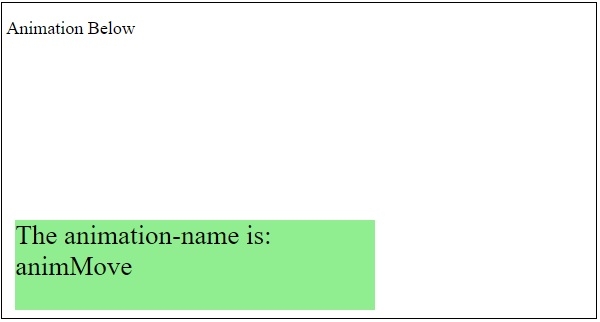
在上面的示例中 −
已使用 div 创建了一个 400px X 100px 的矩形框。
#ANIM-DIV {
   margin: 10px;
   width: 400px;
   height: 100px;
   background: lightgreen;
   position: relative;
   font-size: 30px;
   animation-name: animMove;
   animation-duration: 5s;
}
接下来,我们在 div 将移动到并产生动画效果的位置之间指定了开始和结束位置 −
@-webkit-keyframes animMove {
   from {top: 0px;}
   to {top: 200px;}
}

更新时间: 2021 年 2 月 20 日
213 人次浏览

广告