
 数据结构
数据结构 网络
网络 关系数据库管理系统 (RDBMS)
 操作系统
操作系统 Java
Java MS Excel
 iOS
iOS HTML
HTML CSS
CSS Android
 Python
 C 语言编程
 C++
C++ C#
C# MongoDB
 MySQL
MySQL Javascript
 PHP
PHP 物理学
物理学 化学
化学 生物学
生物学 数学
数学 英语
英语 经济学
经济学 心理学
心理学 社会学
社会学 服装学
服装学 法学
法学HTML DOM 输入密码对象
HTML DOM 输入密码对象与类型为“password”的<input>元素相关联。我们可以分别使用 createElement() 和 getElementById() 方法创建和访问类型为密码的输入元素。
属性
以下是密码对象的属性:
| 序号 | 属性及描述 |
|---|---|
| 1 | autocomplete 设置或返回密码字段的 autocomplete 属性值。 |
| 2 | autofocus 设置或返回密码字段在页面加载时是否应自动获得焦点。 |
| 3 | defaultValue 设置或返回密码字段的默认值。 |
| 4 | disabled 设置或返回密码字段是否被禁用。 |
| 5 | form 返回包含密码字段的表单的引用。 |
| 6 | maxLength 设置或返回密码字段的 maxlength 属性值。 |
| 7 | name 设置或返回密码字段的 name 属性值。 |
| 8 | pattern 设置或返回密码字段的 pattern 属性值。 |
| 9 | placeholder 设置或返回密码字段的 placeholder 属性值。 |
| 10 | readOnly 设置或返回密码字段是否为只读。 |
| 11 | required 设置或返回在提交表单之前是否必须填写密码字段。 |
| 12 | size 设置或返回密码字段的 size 属性值。 |
| 13 | type 这是一个只读属性,返回密码字段所属表单元素的类型。 |
| 14 | value 设置或返回密码字段的 value 属性值。 |
方法
以下是密码对象的方法:
| 序号 | 方法及描述 |
|---|---|
| 1 | select() 选择密码字段的内容。 |
语法
以下是语法:
创建输入密码对象:
var P = document.createElement("INPUT");
P.setAttribute("type", "password");
让我们来看一个输入密码对象的例子:
<!DOCTYPE html>
<html>
<head>
<script>
   function createPASS() {
      var P = document.createElement("INPUT");
      P.setAttribute("type", "password");
      document.body.appendChild(P);
   }
</script>
</head>
<body>
<p>Create an input field with type password by clicking the below button</p>
<button onclick="createPASS()">CREATE</button>
<br><br>
PASSWORD:
</body>
</html>
输出
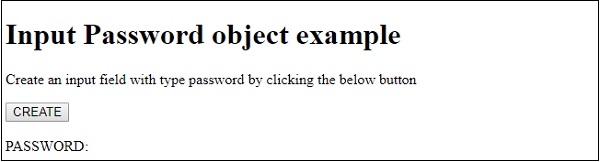
这将产生以下输出:
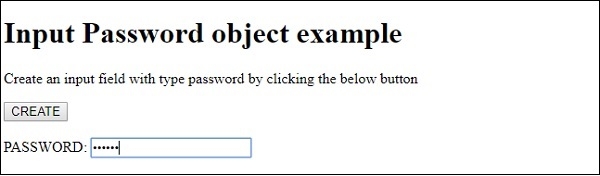
点击“创建”按钮并在新创建的密码字段中输入内容后:
在上面的例子中:
我们有一个名为“创建”的按钮,它将在用户点击时执行 createPass() 方法。
<button onclick="createPASS()">CREATE</button>
createPass() 方法使用 document 对象的 createElement() 方法通过传递“INPUT”作为参数来创建<input>元素。新创建的输入元素被赋值给变量 P,并使用 setAttribute() 方法创建一个值为 password 的 type 属性。请记住,setAttribute() 方法会在属性之前不存在的情况下创建属性并赋值。最后,使用 document.body 上的 appendChild() 方法,我们将类型为 password 的输入元素作为 body 的子元素追加。
function createPASS() {
   var P = document.createElement("INPUT");
   P.setAttribute("type", "password");
   document.body.appendChild(P);
}

更新于:2019年8月22日
200 次查看

广告