
 数据结构
数据结构 网络
网络 RDBMS
RDBMS 操作系统
操作系统 Java
Java MS Excel
 iOS
iOS HTML
HTML CSS
CSS 安卓
安卓 Python
 C 编程
C 编程 C++
C++ C#
C# MongoDB
 MySQL
MySQL Javascript
 PHP
PHP 物理
物理 化学
化学 生物
生物 数学
数学 英语
英语 经济学
经济学 心理学
心理学 社会学
社会学 时尚研究
时尚研究 法律研究
法律研究HTML DOM Input Password size 属性
HTML DOM Input Password size 属性用于设置或返回输入密码大小属性值。它用于定义密码字段宽度的字符数。默认宽度为 20 个字符。
语法
以下是语法 −
设置密码大小属性 −
passwordObject.size = number
这里,number 表示密码字段的字符宽度。默认宽度为 20 个字符。
示例
我们来看一个有关 Input password size 属性的示例 −
<!DOCTYPE html>
<html>
<body>
<h1>Input password size property</h1>
Password: <input type="password" id="PASS1">
<p>Change the Password field width by clicking the below button</p>
<button onclick="changeSize()">CHANGE</button>
<p id="Sample">
<script>
   function changeSize() {
      document.getElementById("PASS1").size+=20;
      var s=document.getElementById("PASS1").size;
      document.getElementById("Sample").innerHTML="The password field width is now "+ s;
   }
</script>
</body>
</html>
输出
这将产生以下输出 −
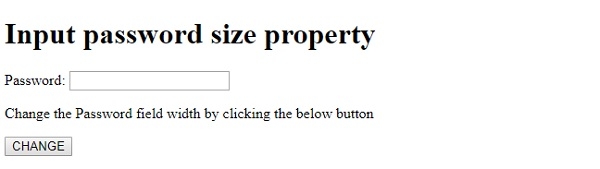
单击 CHANGE 按钮 −
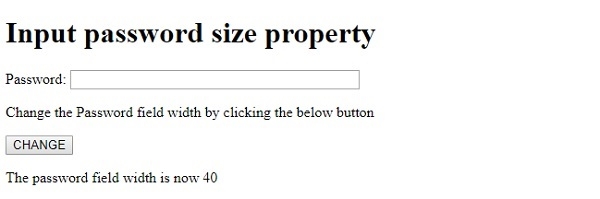
在上面的示例中 −
我们首先创建了一个带有 id“PASS1”的输入密码字段。
Password: <input type="password" id="PASS1">
然后我们创建了一个 CHANGE 按钮,当用户单击该按钮时,该按钮将执行 changeSize() 方法 −
<button onclick="changeSize()">CHANGE</button>
changeSize() 方法使用 getElementById() 方法来获取类型为密码的输入字段,并添加到其 size 属性中。密码字段的总宽度现在增加了 20 个字符。然后我们再次使用 size 属性来获取大小并将其分配给变量 s。然后使用其 innerHTML 属性将新的 size 值显示在 id 为 “Sample” 的段落中。
function changeSize() {
   document.getElementById("PASS1").size+=20;
   var s=document.getElementById("PASS1").size;
   document.getElementById("Sample").innerHTML="The password field width is now "+ s;
}

更新于: 2019-8-22
112 次浏览

广告