
 数据结构
数据结构 网络
网络 RDBMS
RDBMS 操作系统
操作系统 Java
Java MS Excel
 iOS
iOS HTML
HTML CSS
CSS Android
 Python
 C 编程
C 编程 C++
C++ C#
C# MongoDB
 MySQL
MySQL Javascript
 PHP
PHP 物理
物理 化学
化学 生物
生物 数学
数学 英语
英语 经济学
经济学 心理学
心理学 社会研究
社会研究 时装研究
时装研究 法律研究
法律研究使用 Java 向 JTextPane 组件插入图像
假设以下是我们具有橙色背景色的 JTextPane −
JTextPane textPane = new JTextPane();
textPane.setBackground(Color.orange);
现在,设置样式和属性。此外,设置字体 −
SimpleAttributeSet attributeSet = new SimpleAttributeSet();
StyleConstants.setItalic(attributeSet, true);
textPane.setCharacterAttributes(attributeSet, true);
textPane.setText("Recall this and ");
Font font = new Font("Verdana", Font.BOLD, 22);
textPane.setFont(font);
在显示上述文本后,我们将使用 setIcon() 插入图像 −
StyledDocument doc = (StyledDocument) textPane.getDocument();
Style style = doc.addStyle("StyleName", null);
StyleConstants.setIcon(style, new ImageIcon("E:\kind.png"));
doc.insertString(doc.getLength(), "invisible text", style);
以下是将图像插入到组件中的示例。在此处,我们将图像插入到 JTextPane 组件 −
示例
package my;

import java.awt.BorderLayout;
import java.awt.Color;
import java.awt.Container;
import java.awt.Font;
import javax.swing.ImageIcon;
import javax.swing.JFrame;
import javax.swing.JScrollPane;
import javax.swing.JTextPane;
import javax.swing.text.BadLocationException;
import javax.swing.text.SimpleAttributeSet;
import javax.swing.text.Style;
import javax.swing.text.StyleConstants;
import javax.swing.text.StyledDocument;
public class SwingDemo {
   public static void main(String args[]) throws BadLocationException {
      JFrame frame = new JFrame("Demo");
      frame.setDefaultCloseOperation(JFrame.EXIT_ON_CLOSE);
      Container container = frame.getContentPane();
      JTextPane textPane = new JTextPane();
      textPane.setBackground(Color.orange);
      SimpleAttributeSet attributeSet = new SimpleAttributeSet();
      StyleConstants.setItalic(attributeSet, true);
      textPane.setCharacterAttributes(attributeSet, true);
      textPane.setText("Recall this and ");
      Font font = new Font("Verdana", Font.BOLD, 22);
      textPane.setFont(font);
      StyledDocument doc2 = (StyledDocument) textPane.getDocument();
      Style style2 = doc2.addStyle("StyleName", null);
      StyleConstants.setIcon(style2, new ImageIcon("E:\kind.png"));
      doc2.insertString(doc2.getLength(), "invisible text", style2);
      JScrollPane scrollPane = new JScrollPane(textPane);
      scrollPane = new JScrollPane(textPane);
      container.add(scrollPane, BorderLayout.CENTER);
      frame.setSize(550, 300);
      frame.setVisible(true);
   }
}
输出
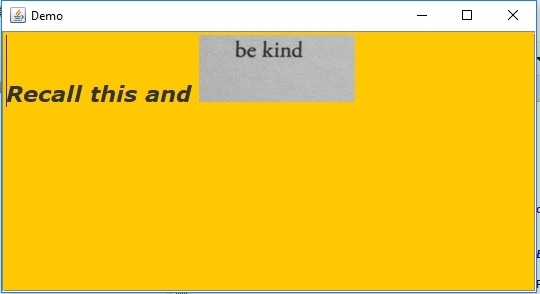

更新于: 2019 年 7 月 30 日
550 次浏览

广告