- Java RMI 有用资源
- Java RMI - 快速指南
- Java RMI - 有用资源
- Java RMI - 讨论
Java RMI 应用程序
要编写一个 RMI Java 应用程序,您需要按照以下步骤操作:
- 定义远程接口
- 开发实现类(远程对象)
- 开发服务器程序
- 开发客户端程序
- 编译应用程序
- 执行应用程序
定义远程接口
远程接口提供特定远程对象所有方法的描述。客户端通过此远程接口进行通信。
创建远程接口:
创建一个扩展预定义接口Remote的接口,该接口属于该包。
在此接口中声明客户端可以调用的所有业务方法。
由于远程调用过程中存在网络问题的可能性,可能会发生名为RemoteException的异常;请抛出该异常。
以下是一个远程接口示例。在这里,我们定义了一个名为Hello的接口,它有一个名为printMsg()的方法。
import java.rmi.Remote;
import java.rmi.RemoteException;

// Creating Remote interface for our application
public interface Hello extends Remote {
   void printMsg() throws RemoteException;
}
开发实现类(远程对象)
我们需要实现前面步骤中创建的远程接口。(我们可以单独编写实现类,也可以直接让服务器程序实现此接口。)
开发实现类:
- 实现上一步中创建的接口。
- 为远程接口的所有抽象方法提供实现。
以下是一个实现类示例。在这里,我们创建了一个名为ImplExample的类,并实现了上一步中创建的Hello接口,并为该方法提供了主体,该主体打印一条消息。
// Implementing the remote interface
public class ImplExample implements Hello {

   // Implementing the interface method
   public void printMsg() {
      System.out.println("This is an example RMI program");
   }
}
开发服务器程序
RMI 服务器程序应实现远程接口或扩展实现类。在这里,我们应该创建一个远程对象并将其绑定到RMIregistry。
开发服务器程序:
创建一个客户端类,从中您可以调用远程对象。
创建远程对象,方法是实例化实现类,如下所示。
使用名为UnicastRemoteObject的类的exportObject()方法导出远程对象,该类属于java.rmi.server包。
使用java.rmi.registry包中的LocateRegistry类的getRegistry()方法获取 RMI 注册表。
使用名为Registry类的bind()方法将创建的远程对象绑定到注册表。为此方法传递一个表示绑定名称的字符串和导出的对象作为参数。
以下是一个 RMI 服务器程序示例。
import java.rmi.registry.Registry;
import java.rmi.registry.LocateRegistry;
import java.rmi.RemoteException;
import java.rmi.server.UnicastRemoteObject;

public class Server extends ImplExample {
   public Server() {}
   public static void main(String args[]) {
      try {
         // Instantiating the implementation class
         ImplExample obj = new ImplExample();

         // Exporting the object of implementation class
         // (here we are exporting the remote object to the stub)
         Hello stub = (Hello) UnicastRemoteObject.exportObject(obj, 0);

         // Binding the remote object (stub) in the registry
         Registry registry = LocateRegistry.getRegistry();

         registry.bind("Hello", stub);
         System.err.println("Server ready");
      } catch (Exception e) {
         System.err.println("Server exception: " + e.toString());
         e.printStackTrace();
      }
   }
}
开发客户端程序
在其中编写一个客户端程序,获取远程对象并使用此对象调用所需的方法。
开发客户端程序:
创建一个客户端类,您打算从中调用远程对象。
使用java.rmi.registry包中的LocateRegistry类的getRegistry()方法获取 RMI 注册表。
使用java.rmi.registry包中的Registry类的lookup()方法从注册表中获取对象。
为此方法,您需要传递一个表示绑定名称的字符串值作为参数。这将返回远程对象。
lookup()返回远程类型的对象,将其向下转换为Hello类型。
最后使用获得的远程对象调用所需的方法。
以下是一个 RMI 客户端程序示例。
import java.rmi.registry.LocateRegistry;
import java.rmi.registry.Registry;

public class Client {
   private Client() {}
   public static void main(String[] args) {
      try {
         // Getting the registry
         Registry registry = LocateRegistry.getRegistry(null);

         // Looking up the registry for the remote object
         Hello stub = (Hello) registry.lookup("Hello");

         // Calling the remote method using the obtained object
         stub.printMsg();

         // System.out.println("Remote method invoked");
      } catch (Exception e) {
         System.err.println("Client exception: " + e.toString());
         e.printStackTrace();
      }
   }
}
编译应用程序
编译应用程序:
- 编译远程接口。
- 编译实现类。
- 编译服务器程序。
- 编译客户端程序。
或者:
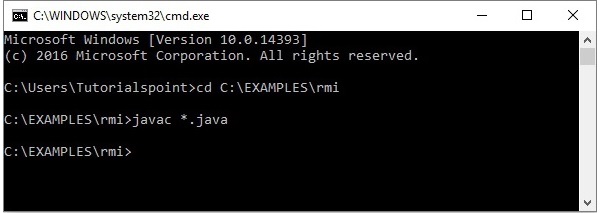
打开您已存储所有程序的文件夹,并编译所有 Java 文件,如下所示。
Javac *.java
执行应用程序
步骤 1 - 使用以下命令启动rmi注册表。
start rmiregistry
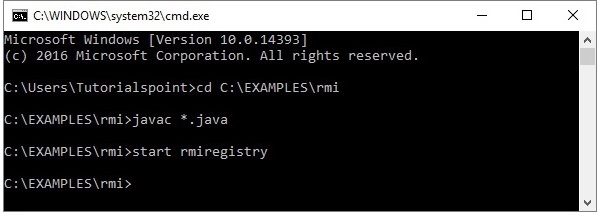
这将在单独的窗口中启动一个rmi注册表,如下所示。
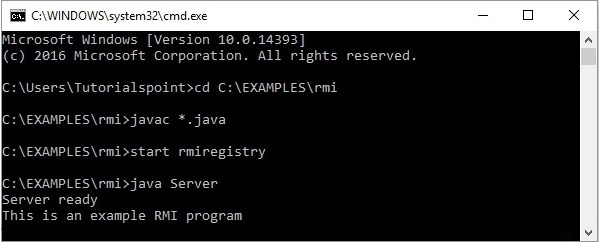
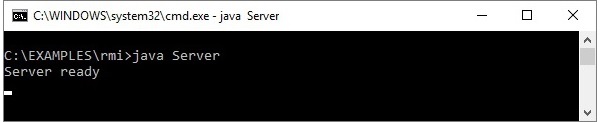
步骤 2 - 运行服务器类文件,如下所示。
Java Server
步骤 3 - 运行客户端类文件,如下所示。
java Client
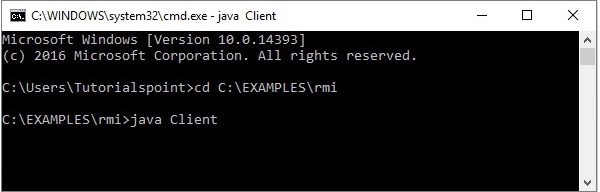
验证 - 启动客户端后,您将在服务器中看到以下输出。