
- Java 编程示例
- 示例 - 主页
- 示例 - 环境
- 示例 - 字符串
- 示例 - 数组
- 示例 - 日期和时间
- 示例 - 方法
- 示例 - 文件
- 示例 - 目录
- 示例 - 异常
- 示例 - 数据结构
- 示例 - 集合
- 示例 - 网络
- 示例 - 线程
- 示例 - 小程序
- 示例 - 简单 GUI
- 示例 - JDBC
- 示例 - 正则表达式
- 示例 - Apache PDF Box
- 示例 - Apache POI PPT
- 示例 - Apache POI Excel
- 示例 - Apache POI Word
- 示例 - OpenCV
- 示例 - Apache Tika
- 示例 - iText
- Java 教程
- Java - 教程
- 有用的 Java 资源
- Java - 快速指南
- Java - 有用资源
如何使用 Java 向 PDF 中添加嵌套表格
问题描述
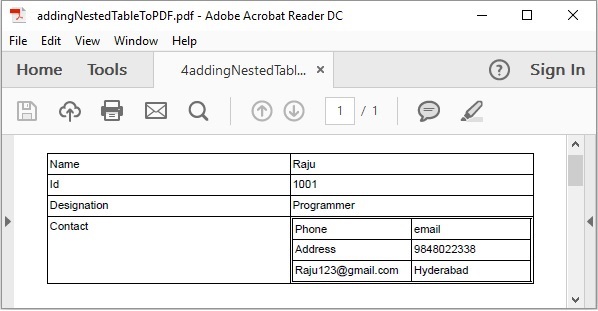
如何使用 Java 向 PDF 中添加嵌套表格。
解决方案
以下是使用 Java 向 PDF 中添加嵌套表格的程序。
import com.itextpdf.kernel.pdf.PdfDocument;
import com.itextpdf.kernel.pdf.PdfWriter;

import com.itextpdf.layout.Document;
import com.itextpdf.layout.element.Cell;
import com.itextpdf.layout.element.Table;

public class AddNestedTablesPdf {
   public static void main(String args[]) throws Exception {
      String file = "C:/EXAMPLES/itextExamples/addingNestedTableToPDF.pdf";

      //Creating a PdfDocument object
      PdfDocument pdfDoc = new PdfDocument(new PdfWriter(file));

      //Creating a Document object
      Document doc = new Document(pdfDoc);

      //Creating a table
      Table table = new Table(2);

      //Adding cells to the table
      table.addCell(new Cell().add("Name"));
      table.addCell(new Cell().add("Raju"));
      table.addCell(new Cell().add("Id"));
      table.addCell(new Cell().add("1001"));
      table.addCell(new Cell().add("Designation"));
      table.addCell(new Cell().add("Programmer"));

      //Creating table for contact
      Table contact = new Table(2);

      //Adding table within a table
      contact.addCell(new Cell().add("Phone"));
      contact.addCell(new Cell().add("email"));
      contact.addCell(new Cell().add("Address"));
      contact.addCell(new Cell().add("9848022338"));
      contact.addCell(new Cell().add("Raju123@gmail.com"));
      contact.addCell(new Cell().add("Hyderabad"));

      //Adding table to the cell
      table.addCell(new Cell().add("Contact"));
      table.addCell(new Cell().add(contact));

      //Adding table to the document
      doc.add(table);

      //Closing the document
      doc.close();
      System.out.println("Nested Table Added successfully..");
   }
}
输出
java_itext
广告