
- Java 编程示例
- 示例 - 首页
- 示例 - 环境
- 示例 - 字符串
- 示例 - 数组
- 示例 - 日期和时间
- 示例 - 方法
- 示例 - 文件
- 示例 - 目录
- 示例 - 异常
- 示例 - 数据结构
- 示例 - 集合
- 示例 - 网络
- 示例 - 线程
- 示例 - 小程序
- 示例 - 简单图形用户界面
- 示例 - JDBC
- 示例 - 正则表达式
- 示例 - Apache PDF Box
- 示例 - Apache POI PPT
- 示例 - Apache POI Excel
- 示例 - Apache POI Word
- 示例 - OpenCV
- 示例 - Apache Tika
- 示例 - iText
- Java 教程
- Java - 教程
- 有用的 Java 资源
- Java - 快速指南
- Java - 有用的资源
如何使用 Java 将不同的样式应用到电子表格中的单元格
问题描述
如何使用 Java 将不同的样式应用到电子表格的单元格。
解决方案
以下是使用 Java 将不同的样式应用到电子表格中的单元格的程序。
import java.io.File;
import java.io.FileOutputStream;

import org.apache.poi.hssf.util.HSSFColor;
import org.apache.poi.ss.usermodel.IndexedColors;
import org.apache.poi.ss.util.CellRangeAddress;

import org.apache.poi.xssf.usermodel.XSSFCell;
import org.apache.poi.xssf.usermodel.XSSFCellStyle;
import org.apache.poi.xssf.usermodel.XSSFRow;
import org.apache.poi.xssf.usermodel.XSSFSheet;
import org.apache.poi.xssf.usermodel.XSSFWorkbook;

public class DifferentStylesToCell {
   public static void main(String[] args)throws Exception {

      //Create a Work Book
      XSSFWorkbook workbook = new XSSFWorkbook();

      //Create a Spread Sheet
      XSSFSheet spreadsheet = workbook.createSheet("cellstyle");
      XSSFRow row = spreadsheet.createRow((short) 1);
      row.setHeight((short) 800);
      XSSFCell cell = (XSSFCell) row.createCell((short) 1);
      cell.setCellValue("test of merging");

      //MEARGING CELLS
      //this statement for merging cells
      spreadsheet.addMergedRegion(new CellRangeAddress(
         1,  //first row (0-based)
         1,  //last row (0-based)
         1,  //first column (0-based)
         4   //last column (0-based)
      ));

      //CELL Alignment
      row = spreadsheet.createRow(5);

      cell = (XSSFCell) row.createCell(0);
      row.setHeight((short) 800);

      // Top Left alignment
      XSSFCellStyle style1 = workbook.createCellStyle();

      spreadsheet.setColumnWidth(0, 8000);
      style1.setAlignment(XSSFCellStyle.ALIGN_LEFT);
      style1.setVerticalAlignment(XSSFCellStyle.VERTICAL_TOP);

      cell.setCellValue("Top Left");
      cell.setCellStyle(style1);
      row = spreadsheet.createRow(6);
      cell = (XSSFCell) row.createCell(1);
      row.setHeight((short) 800);

      //Center Align Cell Contents
      XSSFCellStyle style2 = workbook.createCellStyle();

      style2.setAlignment(XSSFCellStyle.ALIGN_CENTER);
      style2.setVerticalAlignment(XSSFCellStyle.VERTICAL_CENTER);
      cell.setCellValue("Center Aligned");
      cell.setCellStyle(style2);
      row = spreadsheet.createRow(7);
      cell = (XSSFCell) row.createCell(2);
      row.setHeight((short) 800);

      //Bottom Right alignment
      XSSFCellStyle style3 = workbook.createCellStyle();

      style3.setAlignment(XSSFCellStyle.ALIGN_RIGHT);
      style3.setVerticalAlignment(XSSFCellStyle.VERTICAL_BOTTOM);
      cell.setCellValue("Bottom Right");
      cell.setCellStyle(style3);
      row = spreadsheet.createRow(8);
      cell = (XSSFCell) row.createCell(3);

      //Justified Alignment
      XSSFCellStyle style4 = workbook.createCellStyle();

      style4.setAlignment(XSSFCellStyle.ALIGN_JUSTIFY);
      style4.setVerticalAlignment(XSSFCellStyle.VERTICAL_JUSTIFY);
      cell.setCellValue("Contents are Justified in Alignment");
      cell.setCellStyle(style4);

      //CELL BORDER
      row = spreadsheet.createRow((short) 10);

      row.setHeight((short) 800);
      cell = (XSSFCell) row.createCell((short) 1);
      cell.setCellValue("BORDER");
      XSSFCellStyle style5 = workbook.createCellStyle();

      style5.setBorderBottom(XSSFCellStyle.BORDER_THICK);
      style5.setBottomBorderColor(IndexedColors.BLUE.getIndex());
      style5.setBorderLeft(XSSFCellStyle.BORDER_DOUBLE);
      style5.setLeftBorderColor(IndexedColors.GREEN.getIndex());
      style5.setBorderRight(XSSFCellStyle.BORDER_HAIR);
      style5.setRightBorderColor(IndexedColors.RED.getIndex());
      style5.setBorderTop(XSSFCellStyle.BIG_SPOTS);
      style5.setTopBorderColor(IndexedColors.CORAL.getIndex());
      cell.setCellStyle(style5);

      //Fill Colors
      //background color
      row = spreadsheet.createRow((short) 10 );

      cell = (XSSFCell) row.createCell((short) 1);
      XSSFCellStyle style6 = workbook.createCellStyle();

      style6.setFillBackgroundColor(HSSFColor.LEMON_CHIFFON.index );
      style6.setFillPattern(XSSFCellStyle.LESS_DOTS);
      style6.setAlignment(XSSFCellStyle.ALIGN_FILL);

      spreadsheet.setColumnWidth(1,8000);
      cell.setCellValue("FILL BACKGROUNG/FILL PATTERN");
      cell.setCellStyle(style6);

      //Foreground color
      row = spreadsheet.createRow((short) 12);

      cell = (XSSFCell) row.createCell((short) 1);
      XSSFCellStyle style7 = workbook.createCellStyle();
      style7.setFillForegroundColor(HSSFColor.BLUE.index);
      style7.setFillPattern( XSSFCellStyle.LESS_DOTS);
      style7.setAlignment(XSSFCellStyle.ALIGN_FILL);

      cell.setCellValue("FILL FOREGROUND/FILL PATTERN");
      cell.setCellStyle(style7);

      FileOutputStream out = new FileOutputStream(
         new File("C:/poiexcel/differentCellStyle.xlsx"));

      workbook.write(out);
      out.close();
      System.out.println("cellstyle.xlsx written successfully");
   }
}
结果
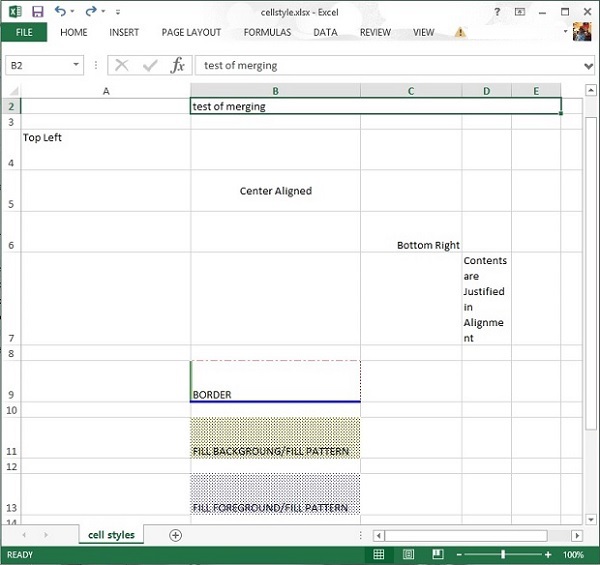
java_apache_poi_excel
广告