
 数据结构
数据结构 网络
网络 关系型数据库管理系统
 操作系统
操作系统 Java
Java MS Excel
 iOS
iOS HTML
HTML CSS
CSS Android
 Python
 C 编程
C 编程 C++
C++ C#
C# MongoDB
 MySQL
MySQL Javascript
 PHP
PHP 物理学
物理学 化学
化学 生物学
生物学 数学
数学 英语
英语 经济学
经济学 心理学
心理学 社会学
社会学 时尚研究
时尚研究 法律研究
法律研究在 Django 中制作一个 URL 缩短器应用程序
在本文中,我们来看看如何在 Django 中制作一个 URL 缩短器应用程序。这是一个简单的应用程序,它将把一个长 URL 转换成一个短 URL。我们将会使用一个 Python 库来实现这个功能,而不是任何 Django 专用库,因此你可以在任何 Python 项目中使用此代码。
首先,创建一个 Django 项目和一个应用程序。进行一些基本设置,如在 settings.py 中包含应用程序的 URL 和在 INSTALLED_APPS 中包含应用程序。
示例
安装 pyshorteners 模块 −
pip install pyshorteners
在应用程序的 urls.py 中 −
from django.urls import path
from .views import url_shortner

urlpatterns = [
   path('', url_shortner.as_view(), name="url-shortner"),
]
在这里,我们在 home url 上设置视图集作为视图。
现在在 views.py 中 −
from django.shortcuts import render
import pyshorteners
from django.views import View

class url_shortner(View):
   def post(self, request):
      long_url = 'url' in request.POST and request.POST['url']
      pys = pyshorteners.Shortener()
      short_url = pys.tinyurl.short(long_url)
      return render(request,'urlShortner.html', context={'short_url':short_url,'long_url':long_url})

   def get(self, request):
return render(request,'urlShortner.html')在这里,我们使用两个请求处理函数创建了一个视图,get 处理程序将呈现前端 html,而post 处理程序将获取长 URL,并使用短 URL 重新呈现我们的前端。
在应用程序目录中创建一个 templates 文件夹,并在其中添加 urlShortner.html,然后编写此内容 −
<!DOCTYPE html>
<html>
   <head>
      <title>Url Shortner</title>
   </head>
   <body>
      <div >
         <h1 >URL Shortner Application</h1>
         <form method="POST">{% csrf_token %}
            <input type="url" name="url" placeholder="Enter the link here" required>
            <button >Shorten URL</button>
         </form>
      </div>
      </div>
      {% if short_url %}
      <div>
         <h3>Your shortened URL /h3>
         <div>
            <input type="url" id="short_url" value={{short_url}}> <button name="short-url">Copy URL</button> <small id="copied" class="px-5"></small>
         </div>
         <br>
         <span><b>Long URL: </b></span> <a href="{{long_url}}">{{long_url}}</a>
      </div>
      {%endif%}
   </body>
</html>
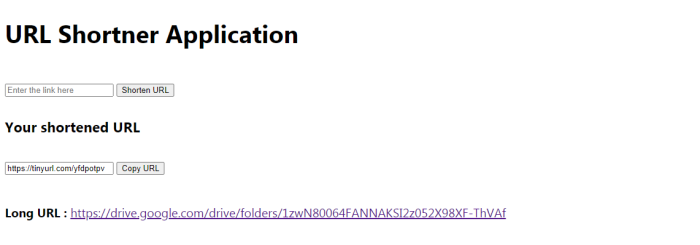
这是前端,它将获取长 URL 并发送请求,然后它返回短 URL。
输出

更新于: 2021-08-26
335 次浏览

广告