
 数据结构
数据结构 网络
网络 关系型数据库管理系统 (RDBMS)
 操作系统
操作系统 Java
Java MS Excel
 iOS
iOS HTML
HTML CSS
CSS Android
 Python
 C语言编程
C语言编程 C++
C++ C#
C# MongoDB
 MySQL
MySQL Javascript
 PHP
PHP 物理学
物理学 化学
化学 生物学
生物学 数学
数学 英语
英语 经济学
经济学 心理学
心理学 社会学
社会学 服装学
服装学 法学
法学Linux系统中Nginx SSL证书安装
本文将帮助您在Linux系统中生成自签名SSL证书,允许您为Nginx配置SSL证书,用于将普通流量转换为受保护的加密流量。使用此服务器可以向客户端发送数据,而无需担心数据会被外部人员拦截。
安装指南
在开始之前,我们需要安装一些软件包。
通过终端登录服务器并安装。
# yum install mod_ssl
opensslResolving Dependencies
--> Running transaction check
---> Package mod_ssl.x86_64 1:2.2.15-47.el6.centos.1 will be updated
---> Package mod_ssl.x86_64 1:2.2.15-47.el6.centos.3 will be an update
--> Processing Dependency: httpd = 2.2.15-47.el6.centos.3 for package: 1:mod_ssl-2.2.15-47.el6.centos.3.x86_64
---> Package openssl.x86_64 0:1.0.1e-42.el6_7.1 will be updated
--> Processing Dependency: openssl = 1.0.1e-42.el6_7.1 for package: openssl-devel-1.0.1e-42.el6_7.1.x86_64
---> Package openssl.x86_64 0:1.0.1e-42.el6_7.4 will be an update
--> Running transaction check
---> Package httpd.x86_64 0:2.2.15-47.el6.centos.1 will be updated
---> Package httpd.x86_64 0:2.2.15-47.el6.centos.3 will be an update
--> Processing Dependency: httpd-tools = 2.2.15-47.el6.centos.3 for package: httpd-2.2.15-47.el6.centos.3.x86_64
---> Package openssl-devel.x86_64 0:1.0.1e-42.el6_7.1 will be updated
---> Package openssl-devel.x86_64 0:1.0.1e-42.el6_7.4 will be an update
--> Running transaction check
---> Package httpd-tools.x86_64 0:2.2.15-47.el6.centos.1 will be updated
---> Package httpd-tools.x86_64 0:2.2.15-47.el6.centos.3 will be an update
--> Finished Dependency Resolution
Dependencies Resolved
==========================================================================================================================================
Package Arch Version Repository Size
==========================================================================================================================================
Updating:
mod_ssl x86_64 1:2.2.15-47.el6.centos.3 updates 95 k
openssl x86_64 1.0.1e-42.el6_7.4 updates 1.5 M
Updating for dependencies:
httpd x86_64 2.2.15-47.el6.centos.3 updates 831 k
httpd-tools x86_64 2.2.15-47.el6.centos.3 updates 77 k
openssl-devel x86_64 1.0.1e-42.el6_7.4 updates 1.2 M
Transaction Summary
==========================================================================================================================================
Upgrade 5 Package(s)
Total download size: 3.7 M
Is this ok [y/N]: y
Downloading Packages:
(1/5): httpd-2.2.15-47.el6.centos.3.x86_64.rpm | 831 kB 00:00
(2/5): httpd-tools-2.2.15-47.el6.centos.3.x86_64.rpm | 77 kB 00:00
(3/5): mod_ssl-2.2.15-47.el6.centos.3.x86_64.rpm | 95 kB 00:00
(4/5): openssl-1.0.1e-42.el6_7.4.x86_64.rpm | 1.5 MB 00:00
(5/5): openssl-devel-1.0.1e-42.el6_7.4.x86_64.rpm | 1.2 MB 00:00
------------------------------------------------------------------------------------------------------------------------------------------
Total 529 kB/s | 3.7 MB 00:07
Running rpm_check_debug
Running Transaction Test
Transaction Test Succeeded
Running Transaction
Updating : openssl-1.0.1e-42.el6_7.4.x86_64 1/5
Updating : httpd-tools-2.2.15-47.el6.centos.3.x86_64 2/5
Updating : httpd-2.2.15-47.el6.centos.3.x86_64 3/5
Updating : 1:mod_ssl-2.2.15-47.el6.centos.3.x86_64 4/5
Updating :openssl-devel-1.0.1e-42.el6_7.4.x86_64 5/5
Updated:
mod_ssl.x86_64 1:2.2.15-47.el6.centos.3 openssl.x86_64 0:1.0.1e-42.el6_7.4
Dependency Updated:
httpd.x86_64 0:2.2.15-47.el6.centos.3 httpd-tools.x86_64 0:2.2.15-47.el6.centos.3 openssl-devel.x86_64 0:1.0.1e-42.el6_7.4
Complete!
生成密钥文件
要生成SSL证书文件,我们需要运行以下命令。
这将开始生成两个文件的过程:用于解密SSL证书的私钥文件和用于申请SSL证书的证书签名请求 (CSR) 文件。
当系统提示您输入通用名称(域名)时,请输入您要保护站点的完全限定域名。如果您要为通配符SSL证书生成Nginx CSR,请确保您的通用名称以星号开头(例如,*.example.com)。
之后,系统将提示您输入组织信息,从地理信息开始。可能已经设置了一些默认信息。
# openssl req -new -newkey rsa:2048 -nodes -keyout your_domain_name.key -out your_domain_name.csr
Generating a 2048 bit RSA private key
..................+++
........................+++
writing new private key to 'your_domain_name.key'
-----
You are about to be asked to enter information that will be incorporated
into your certificate request.
What you are about to enter is what is called a Distinguished Name or a DN.
There are quite a few fields but you can leave some blank
For some fields there will be a default value,
If you enter '.', the field will be left blank.
-----
Country Name (2 letter code) [XX]:IN
State or Province Name (full name) []:TELENGANA
Locality Name (eg, city) [Default City]:HYDERABAD
Organization Name (eg, company) [Default Company Ltd]:domain_name.com
Organizational Unit Name (eg, section) []:HYDERABAD
Common Name (eg, your name or your server's hostname) []:domain_name.com
Email Address []:server@ domain_name.com
Please enter the following 'extra' attributes
to be sent with your certificate request
A challenge password []:test
An optional company name []:test
Your .csr file will be created.
保存(备份)生成的.key文件,因为稍后在Nginx中安装SSL证书时需要它。
将生成的证书文件your_domain_name.key和your_domain_name.csr复制到/etc/ssl/domainname。
# mkdir -p /etc/ssl/domain_name
# cp your_domain_name.* /etc/ssl/domain_name
编辑Nginx虚拟主机文件
现在打开您要保护的网站的Nginx虚拟主机文件。如果您需要您的站点可以通过安全 (https) 和非安全 (http) 连接访问,则需要为每种类型的连接创建一个服务器模块。复制现有的非安全服务器模块,并将其粘贴到原始模块下方。然后添加以下粗体行:
# vi /etc/nginx/conf.d/virtual.conf
server {
   listen 443;
   ssl on;
   ssl_certificate /etc/ssl/your_domain_name.pem; (or bundle.crt)
   ssl_certificate_key /etc/ssl/your_domain_name.key;
   server_name your.domain.com;
   access_log /var/log/nginx/nginx.vhost.access.log;
   error_log /var/log/nginx/nginx.vhost.error.log;
   location / {
      root /home/www/public_html/your.domain.com/public/;
      index index.html;
   }
}
调整文件名以匹配您的证书文件
ssl_certificate 应该是您的主证书与您在前面步骤中生成的中间证书组合而成(例如,your_domain_name.crt)。
ssl_certificate_key 应该是创建CSR时生成的密钥文件。
重启Nginx
运行以下命令重启Nginx以应用配置文件中的更改。
# sudo /etc/init.d/nginx restart
重启Nginx服务后,我们现在可以访问该站点并检查它是否已获得SSL证书。
此外,我们可以看到https以绿色显示,如下面的屏幕截图所示。

如果我们想查看证书的详细信息,请点击以绿色显示的**https**,然后点击详细信息。
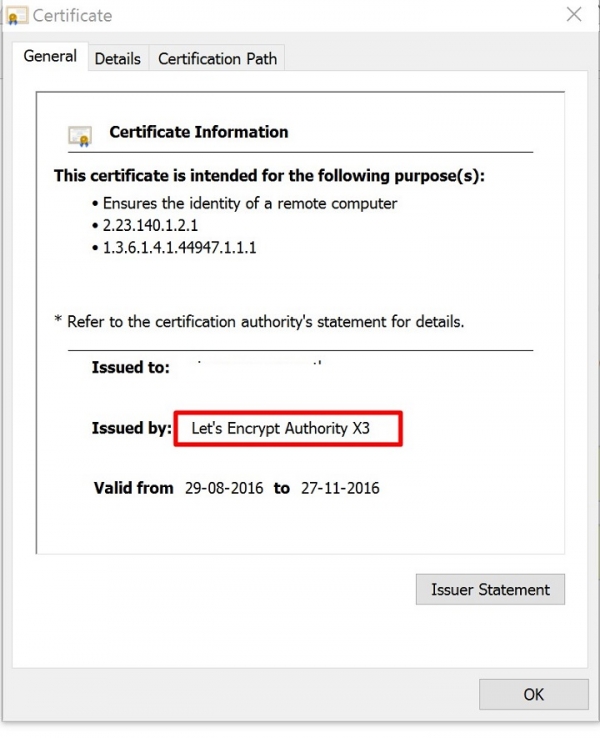
现在我们可以看到证书信息以及Let's Encrypt Authority颁发的证书。
在上面的文章中,我们学习了如何从**Let's Encrypt**获取SSL证书,这是一个数字签名的SSL证书(免费提供),用作在Nginx Web服务器上保护站点的证书。

258 次浏览
