- NHibernate 教程
- NHibernate - 首页
- NHibernate - 概述
- NHibernate - 架构
- NHibernate - ORM
- NHibernate - 环境设置
- NHibernate - 快速入门
- NHibernate - 基本ORM
- NHibernate - 基本CRUD操作
- NHibernate - 性能分析器
- 为映射文件添加IntelliSense
- NHibernate - 数据类型映射
- NHibernate - 配置
- NHibernate - 覆盖配置
- NHibernate - 批处理大小
- NHibernate - 缓存
- NHibernate - 映射组件
- NHibernate - 关系
- NHibernate - 集合映射
- NHibernate - 级联操作
- NHibernate - 延迟加载
- NHibernate - 反向关系
- NHibernate - Load/Get
- NHibernate - LINQ
- NHibernate - 查询语言
- NHibernate - Criteria 查询
- NHibernate - QueryOver 查询
- NHibernate - 原生SQL
- NHibernate - Fluent NHibernate
- NHibernate 有用资源
- NHibernate - 快速指南
- NHibernate - 有用资源
- NHibernate - 讨论
NHibernate - 基本CRUD操作
本章我们将介绍基本的CRUD 操作。现在我们的系统已经准备好启动,因为我们已经成功实现了Student类,也定义了映射文件并配置了NHibernate。现在我们可以使用一些查询来执行CRUD操作。
创建数据
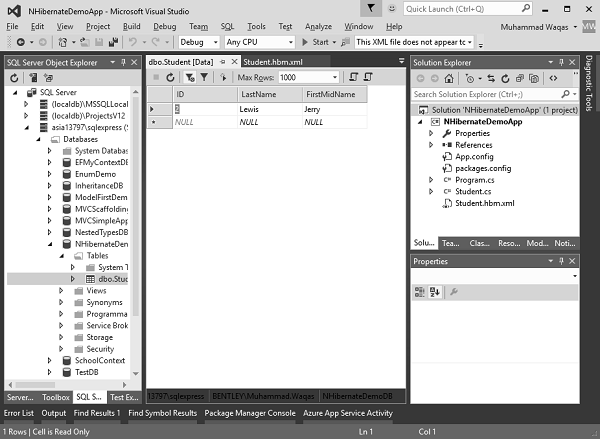
您可以看到我们的NHibernateDemoDB数据库中的Student表中没有数据。
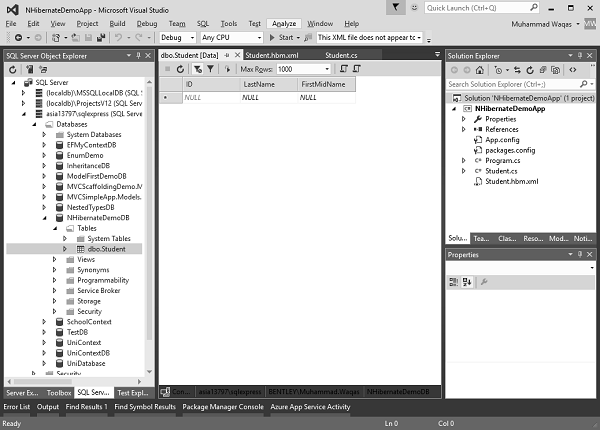
因此,要添加一些数据,我们需要执行如下所示的添加/创建操作。
using (var session = sefact.OpenSession()) {

   using (var tx = session.BeginTransaction()) {

      var student1 = new Student {
         ID = 1,
         FirstMidName = "Allan",
         LastName = "Bommer"
      };

      var student2 = new Student {
         ID = 2,
         FirstMidName = "Jerry",
         LastName = "Lewis"
      };

      session.Save(student1);
      session.Save(student2);
      tx.Commit();
   }

   Console.ReadLine();
}
您可以看到我们创建了两个学生,然后调用OpenSession的Save()方法,然后调用BeginTransaction的Commit()方法。以下是Program.cs文件的完整实现
using NHibernate.Cfg;
using NHibernate.Dialect;
using NHibernate.Driver;

using System;
using System.Linq;
using System.Reflection;

namespace NHibernateDemoApp {

   class Program {

      static void Main(string[] args) {
         var cfg = new Configuration();

         String Data Source = asia13797\\sqlexpress;
         String Initial Catalog = NHibernateDemoDB;
         String Integrated Security = True;
         String Connect Timeout = 15;
         String Encrypt = False;
         String TrustServerCertificate = False;
         String ApplicationIntent = ReadWrite;
         String MultiSubnetFailover = False;

         cfg.DataBaseIntegration(x = > { x.ConnectionString = "Data Source +
            Initial Catalog + Integrated Security + Connect Timeout + Encrypt +
            TrustServerCertificate + ApplicationIntent + MultiSubnetFailover";

            x.Driver<SqlClientDriver>();
            x.Dialect<MsSql2008Dialect>();
         });

         cfg.AddAssembly(Assembly.GetExecutingAssembly());
         var sefact = cfg.BuildSessionFactory();

         using (var session = sefact.OpenSession()) {

            using (var tx = session.BeginTransaction()) {

               var student1 = new Student {
                  ID = 1,
                  FirstMidName = "Allan",
                  LastName = "Bommer"
               };

               var student2 = new Student {
                  ID = 2,
                  FirstMidName = "Jerry",
                  LastName = "Lewis"
               };

               session.Save(student1);
               session.Save(student2);
               tx.Commit();
            }

            Console.ReadLine();
         }
      }
   }
}
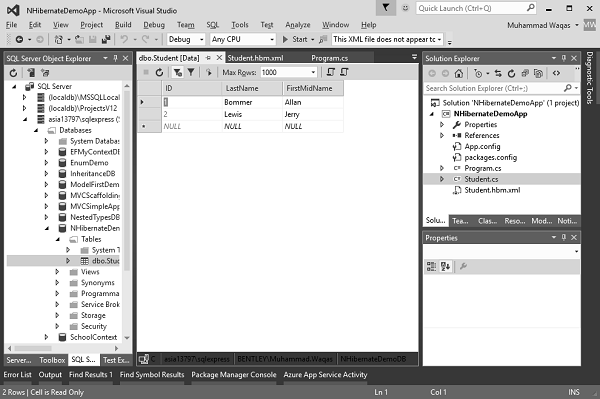
现在让我们运行此应用程序,然后转到SQL Server 对象资源管理器并刷新数据库。您将看到以上两个学生现在已添加到NHibernateDemoDB数据库的Student表中。
从Student表读取数据
您可以看到现在我们的学生表中有两条记录。要从表中读取这些记录,我们需要调用OpenSession的CreateCriteria()方法,如下面的代码所示。
using (var session = sefact.OpenSession()) {

   using (var tx = session.BeginTransaction()) {
      var students = session.CreateCriteria<Student>().List<Student>();

      foreach (var student in students) {
         Console.WriteLine("{0} \t{1} \t{2}",
            student.ID,student.FirstMidName, student.LastName);
      }

      tx.Commit();
   }

   Console.ReadLine();
}
因此,如果您想要记录列表,我们可以简单地说Student类型的列表。
现在使用foreach遍历所有学生,并在控制台上打印ID、FirstMidName和LastName。现在,让我们再次运行此应用程序,您将在控制台窗口中看到以下输出。
1 Allan Bommer
2 Jerry Lewis
您还可以通过使用以下代码在OpenSession的Get()方法中指定ID来检索任何记录。
using (var session = sefact.OpenSession()) {

   using (var tx = session.BeginTransaction()) {
      var students = session.CreateCriteria<Student>().List<Student>();

      foreach (var student in students) {
         Console.WriteLine("{0} \t{1} \t{2}", student.ID,
            student.FirstMidName, student.LastName);
      }

      var stdnt = session.Get<Student>(1);
      Console.WriteLine("Retrieved by ID");
      Console.WriteLine("{0} \t{1} \t{2}", stdnt.ID,
         stdnt.FirstMidName, stdnt.LastName);
      tx.Commit();
   }

   Console.ReadLine();
}
现在运行您的应用程序,您将看到以下输出。
1 Allan Bommer
2 Jerry Lewis
Retrieved by ID
1 Allan Bommer
更新记录
要更新表中的记录,我们需要首先获取该特定记录,然后通过调用OpenSession的Update()方法来更新该记录,如下面的代码所示。
using (var session = sefact.OpenSession()) {

   using (var tx = session.BeginTransaction()) {
      var students = session.CreateCriteria<Student>().List<Student>();

      foreach (var student in students) {
         Console.WriteLine("{0} \t{1} \t{2}", student.ID,
            student.FirstMidName, student.LastName);
      }

      var stdnt = session.Get<Student>(1);
      Console.WriteLine("Retrieved by ID");
      Console.WriteLine("{0} \t{1} \t{2}", stdnt.ID, stdnt.FirstMidName, stdnt.LastName);

      Console.WriteLine("Update the last name of ID = {0}", stdnt.ID);
      stdnt.LastName = "Donald";
      session.Update(stdnt);
      Console.WriteLine("\nFetch the complete list again\n");

      foreach (var student in students) {
         Console.WriteLine("{0} \t{1} \t{2}", student.ID,
            student.FirstMidName, student.LastName);
      }

      tx.Commit();
   }

   Console.ReadLine();
}
现在运行您的应用程序,您将看到以下输出。
1 Allan Bommer
2 Jerry Lewis
Retrieved by ID
1 Allan Bommer
Update the last name of ID = 1
Fetch the complete list again
1 Allan Donald
2 Jerry Lewis
您可以看到,ID等于1的LastName已从Bommer更新为Donald。
删除记录
要从表中删除任何记录,我们需要首先获取该特定记录,然后通过调用OpenSession的Delete()方法来删除该记录,如下面的代码所示。
using (var session = sefact.OpenSession()) {

   using (var tx = session.BeginTransaction()) {
      var students = session.CreateCriteria<Student>().List<Student>();

      foreach (var student in students) {
         Console.WriteLine("{0} \t{1} \t{2}", student.ID,
            student.FirstMidName, student.LastName);
      }

      var stdnt = session.Get<Student>(1);
      Console.WriteLine("Retrieved by ID");
      Console.WriteLine("{0} \t{1} \t{2}", stdnt.ID, stdnt.FirstMidName, stdnt.LastName);

      Console.WriteLine("Delete the record which has ID = {0}", stdnt.ID);
      session.Delete(stdnt);
      Console.WriteLine("\nFetch the complete list again\n");

      foreach (var student in students) {
         Console.WriteLine("{0} \t{1} \t{2}", student.ID, student.FirstMidName,
            student.LastName);
      }

      tx.Commit();
   }

   Console.ReadLine();
}
现在运行您的应用程序,您将看到以下输出。
1 Allan Donald
2 Jerry Lewis
Retrieved by ID
1 Allan Bommer
Delete the record which has ID = 1
Fetch the complete list again
2 Jerry Lewis
您可以看到ID等于1的记录不再存在于数据库中。您也可以在SQL Server 对象资源管理器中查看数据库。