
 数据结构
数据结构 网络
网络 RDBMS
RDBMS 操作系统
操作系统 Java
Java MS Excel
 iOS
iOS HTML
HTML CSS
CSS Android
 Python
 C 编程
C 编程 C++
C++ C#
C# MongoDB
 MySQL
MySQL Javascript
 PHP
PHP 物理
物理 化学
化学 生物
生物 数学
数学 英语
英语 经济学
经济学 心理学
心理学 社会研究
社会研究 时尚研究
时尚研究 法律研究
法律研究Python Tkinter – 如何将一个 topLevel() 控件相对于根窗口定位?
在 Tkinter 中,toplevel 控件用于创建弹出模态窗口。由 toplevel 窗口创建的弹出窗口与 tkinter 应用程序的默认窗口类似。它可以拥有控件,例如 文本控件、按钮控件、画布控件、框架 等。
toplevel 窗口的大小和位置可以通过使其在整个屏幕中灵活自如来决定。在 toplevel 窗口中,所有控件始终放置在其他窗口之上。
您可以使用 root.winfo_x() 和 root.winfo_y() 来获取根窗口的位置。然后,您可以使用 geometry 方法将 toplevel 控件相对于根窗口定位。使 toplevel 控件相对于根窗口定位可以防止两个窗口重叠并将其分开。我们举个例子来演示它如何工作。
示例
# Import the required libraries
from tkinter import *

# Create an instance of tkinter frame or window
win = Tk()

# Set the size of the window
win.geometry("700x300")
win.title("Root Window")

# Create a toplevel window
top = Toplevel(win)
top.geometry("400x200")

# Create a Label in the toplevel widget
Label(top, text= "This is a Toplevel window", font="Calibri, 12").pack()
x = win.winfo_x()
y = win.winfo_y()
top.geometry("+%d+%d" %(x+200,y+200))

# Keep the toplevel window in front of the root window
top.wm_transient(win)

top.mainloop()
输出
运行以上代码将显示一个除了主窗口之外的 toplevel 窗口。
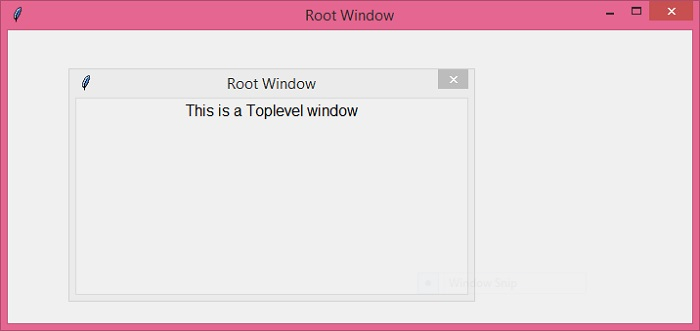

更新于: 16-Dec-2021
6K+ 次观看

广告