
 数据结构
数据结构 网络
网络 关系数据库管理系统
 操作系统
操作系统 Java
Java MS Excel
 iOS
iOS HTML
HTML CSS
CSS Android
 Python
 C 编程
C 编程 C++
C++ C#
C# MongoDB
 MySQL
MySQL Javascript
 PHP
PHP 物理
物理 化学
化学 生物
生物 数学
数学 英语
英语 经济
经济 心理学
心理学 社会研究
社会研究 时尚研究
时尚研究 法律研究
法律研究Python Tkinter – 设置条目宽度 100%
Tkinter 条目小组件接受文本字段中的单行用户输入。我们可以通过在其构造函数中提供默认属性和值来更改条目小组件的属性。
假设我们要为应用程序创建一个全宽条目小组件。有几种方法可以做到这一点,但是如果我们考虑使用 Pack Geometry Manager 来显示条目小组件的最简单的情况,那么我们完全可以通过添加fill(x 或 y)属性来设置条目小组件的宽度。
示例
# Import the required library
from tkinter import *
from tkinter import ttk

# Create an instance of tkinter frame or window
win= Tk()

# Set the size of the window
win.geometry("700x350")

# Add bottom widgets in the application
label= Label(win, text= "Enter Your Name")
label.pack()

# Add an entry widget
entry= Entry(win)
entry.pack(fill='x')

win.mainloop()
输出
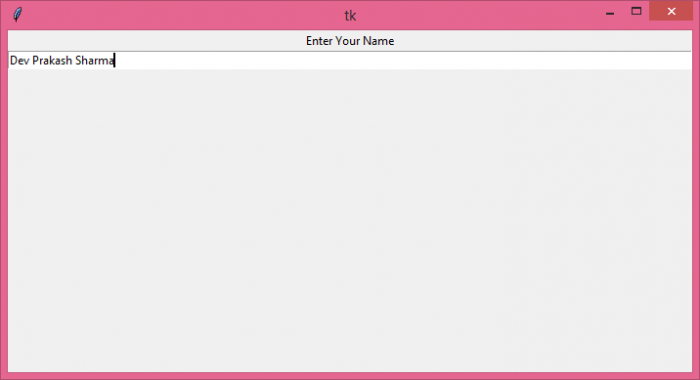
执行上述代码将显示一个全宽条目小组件,该小组件展开以覆盖窗口中的 X 轴。

更新于: 07-6 月-2021
2K+ 浏览

广告