
 数据结构
数据结构 组网
组网 RDBMS
RDBMS 操作系统
操作系统 Java
Java MS Excel
 iOS
iOS HTML
HTML CSS
CSS Android
 Python
 C 编程
C 编程 C++
C++ C#
C# MongoDB
 MySQL
MySQL Javascript
 PHP
PHP 物理
物理 化学
化学 生物
生物 数学
数学 英语
英语 经济学
经济学 心理学
心理学 社会研究
社会研究 服装研究
服装研究 法学研究
法学研究ReactJS – shouldComponentUpdate() 方法
在本文中,我们来看看如何提高 React 应用的性能,使其仅在传递给它的道具发生变化或满足某些条件时重新呈现组件。
此方法主要用于退出复杂的 React 生命周期,但大范围使用它可能会导致应用程序中的错误。
语法
shouldComponentUpdate(nextProps, nextState)
默认情况下,此方法的返回值为 true;但如果它返回 false,则不会调用 render()、componentWillUpdate() 和 componentDidUpdate() 方法。
示例 1
在此示例中,我们将构建一个 React 应用,仅当传递给它们的道具发生变化时,才会重新呈现组件。
在以下示例中的第一个组件是 App。此组件是 MyComp 组件的父级。我们单独创建 MyComp ,然后将其添加到 App 组件中的 JSX 树中。只需导出 App 组件。
App.jsx
import React from 'react';

class App extends React.Component {
   constructor() {
      super();
      this.state = { color: '#000' };
   }
   render() {
      return (
         <div>
            <h1 style={{ color: this.state.color }}>Tutorialspoint</h1>
            <button onClick={() => this.setState({ color: '#ff0000' })}>
               Change Color
            </button>
            <MyComp />
         </div>
      );
   }
}
class MyComp extends React.Component {
   shouldComponentUpdate(nextProps) {
      // Rendering the component only if
      // passed props value is changed
      if (nextProps.value !== this.props.value) {
         return true;
      } else {
         return false;
      }
   }
   render() {
      console.log('MyComp component is called');
      return (
         <div>
            <h1>Simply Easy Learning</h1>
         </div>
      );
   }
}
export default App;
输出
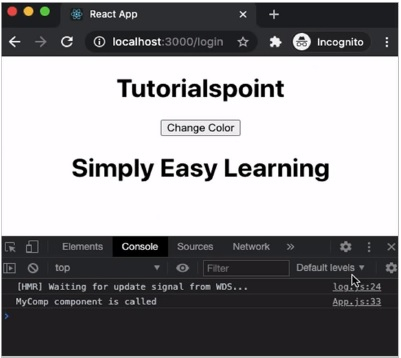
在上面示例中,MyComp 组件仅在接收的道具与之前的道具不同时才重新呈现。上面的代码将产生以下结果 -
示例 2
在下一个示例中,我们将不使用 shouldComponentUpdate() 方法执行相同的代码以查看差异。
App.jsx
import React from 'react';

class App extends React.Component {
   constructor() {
      super();
      this.state = { color: '#000' };
   }
   render() {
      return (
         <div>
            <h1 style={{ color: this.state.color }}>Tutorialspoint</h1>
            <button onClick={() => this.setState({ color: '#ff0000' })}>
               Change Color
            </button>
            <MyComp />
         </div>
      );
   }
}
class MyComp extends React.Component {
   render() {
      console.log('MyComp component is called');
      return (
         <div>
            <h1>Simply Easy Learning</h1>
         </div>
      );
   }
}
export default App;
输出
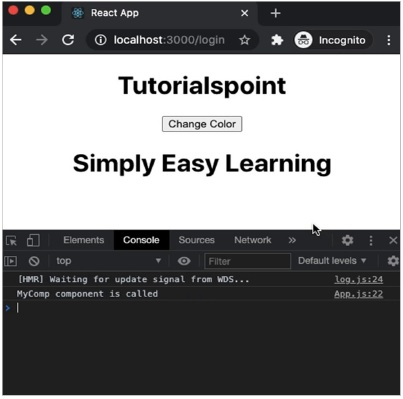
在这里,MyComp 组件在每次父组件(即App 组件)重新呈现时都会重新呈现。上面的代码将产生以下结果 -

更新于:18-Mar-2021
2K+ 浏览

广告