
使用 RxJS 和 ReactJS
在本章中,我们将介绍如何将 RxJS 与 ReactJS 一起使用。我们不会在此处讨论 ReactJS 的安装过程,要了解 ReactJS 安装,请参考此链接:/reactjs/reactjs_environment_setup.htm
示例
我们将在下面的示例中直接进行操作,其中将使用来自 RxJS 的 Ajax 来加载数据。
index.js
import React, { Component } from "react";
import ReactDOM from "react-dom";
import { ajax } from 'rxjs/ajax';
import { map } from 'rxjs/operators';
class App extends Component {
   constructor() {
      super();
      this.state = { data: [] };
   }
   componentDidMount() {
      const response = ajax('https://jsonplaceholder.typicode.com/users').pipe(map(e => e.response));
      response.subscribe(res => {
         this.setState({ data: res });
      });
   }
   render() {
      return (
         <div>
            <h3>Using RxJS with ReactJS</h3>
            <ul>
               {this.state.data.map(el => (
                  <li>
                     {el.id}: {el.name}
                  </li>
               ))}
            </ul>
         </div>
      );
   }
}
ReactDOM.render(<App />, document.getElementById("root"));
index.html
<!DOCTYPE html>
<html>
   <head>
      <meta charset = "UTF-8" />
      <title>ReactJS Demo</title>
   <head>
   <body>
      <div id = "root"></div>
   </body>
</html>
我们使用了来自 RxJS 的 ajax,该 ajax 将从该 URL 加载数据: https://jsonplaceholder.typicode.com/users。
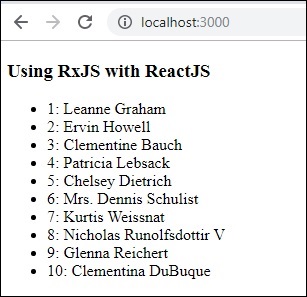
编译后,显示如下所示:-
广告