
 数据结构
数据结构 网络
网络 关系型数据库管理系统
 操作系统
操作系统 Java
Java MS Excel
 iOS
iOS HTML
HTML CSS
CSS Android
 Python
 C 编程
C 编程 C++
C++ C#
C# MongoDB
 MySQL
MySQL Javascript
 PHP
PHP 物理
物理 化学
化学 生物
生物 数学
数学 英语
英语 经济学
经济学 心理学
心理学 社会科学
社会科学 服装研究
服装研究 法律研究
法律研究使用 Selenium 鼠标悬停操作从菜单的子菜单中选择项目
我们可以在 Selenium webdriver 中使用鼠标悬停操作从菜单的子菜单中选择一个项目,这是借助操作类完成的。我们将创建一个操作类对象,然后对其应用移动到元素。
此方法将鼠标移动到菜单的中间,该菜单在鼠标悬停时显示子菜单。然后应用执行方法来实际执行此操作。在菜单上悬停之后,我们将在点击方法的帮助下选择一个子菜单。
语法
WebElement n=driver.findElement(By.id("nav-link-accountList"));
Actions a = new Actions(driver);
a.moveToElement(n).perform();
让我们悬停在页面上下面突出显示的菜单上,然后选择一个子菜单——创建一个列表 −
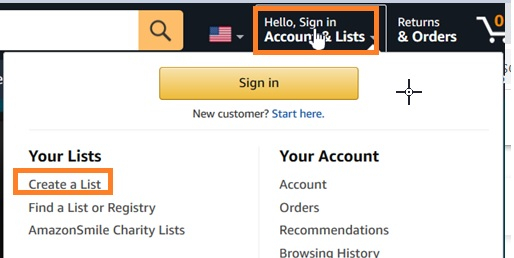
示例
import org.openqa.selenium.By;
import org.openqa.selenium.WebDriver;
import org.openqa.selenium.WebElement;
import org.openqa.selenium.firefox.FirefoxDriver;
import java.util.concurrent.TimeUnit;
import org.openqa.selenium.interactions.Action;
import org.openqa.selenium.interactions.Actions;
public class SubMenuClick{
   public static void main(String[] args) {
      System.setProperty("webdriver.gecko.driver",
         "C:\Users\ghs6kor\Desktop\Java\geckodriver.exe");
      WebDriver driver = new FirefoxDriver();
      //implicit wait
      driver.manage().timeouts().implicitlyWait(5, TimeUnit.SECONDS);
      //URL launch
      driver.get("https://www.amazon.com/");
      //identify menu
      WebElement n=driver.findElement(By.id("nav-link-accountList"));
      // object of Actions with method moveToElement
      Actions a = new Actions(driver);
      a.moveToElement(n).perform();
      //identify sub-menu element
      WebElement m=driver.
      findElement(By.xpath("//*[text()='Create a List']"));
      //move to element and click
      a.moveToElement(m).click().perform();
      System.out.println("Page navigated to: " +driver.getTitle());
      driver.quit();
   }
}
输出


更新时间: 07-Apr-2021
6K+ 浏览次数

广告