
 数据结构
数据结构 网络
网络 关系数据库管理系统 (RDBMS)
 操作系统
操作系统 Java
Java MS Excel
 iOS
iOS HTML
HTML CSS
CSS Android
 Python
 C语言编程
C语言编程 C++
C++ C#
C# MongoDB
 MySQL
MySQL Javascript
 PHP
PHP 物理学
物理学 化学
化学 生物学
生物学 数学
数学 英语
英语 经济学
经济学 心理学
心理学 社会学
社会学 服装设计
服装设计 法学
法学使用Python从Gmail帐户发送带附件的邮件
在本文中,我们将学习如何使用Python发送带有附件的电子邮件。发送邮件不需要任何外部库。Python自带一个名为SMTPlib的模块。它使用SMTP(简单邮件传输协议)发送邮件,并创建用于邮件发送的SMTP客户端会话对象。
SMTP需要有效的发件人和收件人邮箱ID以及端口号。不同网站的端口号各不相同。例如,Google的端口号为587。
首先,我们需要导入发送邮件的模块。
import smtplib
这里我们还使用了MIME(多用途互联网邮件扩展)模块来提高灵活性。使用MIME标头,我们可以存储发件人和收件人信息以及其他一些详细信息。MIME也需要设置邮件附件。
我们使用Google的Gmail服务发送邮件。因此,出于Google的安全考虑,我们需要一些设置(如果需要)。如果这些设置没有配置好,那么如果Google不支持第三方应用程序的访问,以下代码可能无法运行。
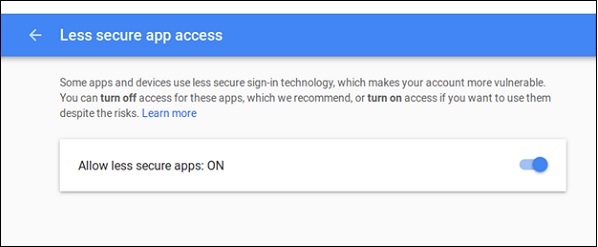
要允许访问,我们需要在Google帐户中设置“安全性较低的应用访问”设置。如果启用了两步验证,则无法使用安全性较低的访问。
要完成此设置,请访问Google的管理控制台,并搜索“安全性较低的应用”设置。
使用SMTP (smtplib)发送带附件邮件的步骤
- 创建MIME
- 将发件人和收件人地址添加到MIME
- 将邮件标题添加到MIME
- 将邮件正文添加到MIME
- 以二进制模式打开将要作为附件添加到邮件的文件
- 读取字节流并使用base64编码方案对附件进行编码。
- 添加附件的标头
- 使用有效的端口号和适当的安全功能启动SMTP会话。
- 登录系统。
- 发送邮件并退出
示例代码
import smtplib
from email.mime.multipart import MIMEMultipart
from email.mime.text import MIMEText
from email.mime.base import MIMEBase
from email import encoders
mail_content = '''Hello,
This is a test mail.
In this mail we are sending some attachments.
The mail is sent using Python SMTP library.
Thank You
'''
#The mail addresses and password
sender_address = 'sender123@gmail.com'
sender_pass = 'xxxxxxxx'
receiver_address = 'receiver567@gmail.com'
#Setup the MIME
message = MIMEMultipart()
message['From'] = sender_address
message['To'] = receiver_address
message['Subject'] = 'A test mail sent by Python. It has an attachment.'
#The subject line
#The body and the attachments for the mail
message.attach(MIMEText(mail_content, 'plain'))
attach_file_name = 'TP_python_prev.pdf'
attach_file = open(attach_file_name, 'rb') # Open the file as binary mode
payload = MIMEBase('application', 'octate-stream')
payload.set_payload((attach_file).read())
encoders.encode_base64(payload) #encode the attachment
#add payload header with filename
payload.add_header('Content-Decomposition', 'attachment', filename=attach_file_name)
message.attach(payload)
#Create SMTP session for sending the mail
session = smtplib.SMTP('smtp.gmail.com', 587) #use gmail with port
session.starttls() #enable security
session.login(sender_address, sender_pass) #login with mail_id and password
text = message.as_string()
session.sendmail(sender_address, receiver_address, text)
session.quit()
print('Mail Sent')
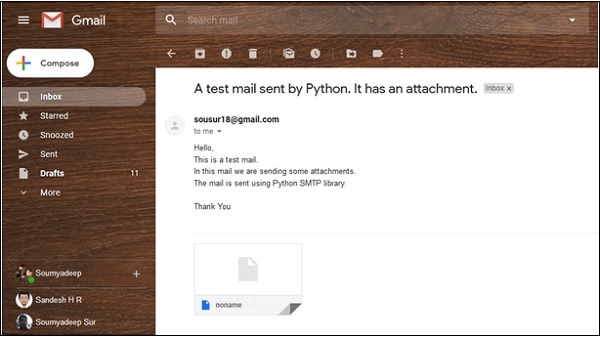
输出
D:\Python TP\Python 450\linux>python 327.Send_Mail.py
Mail Sent

更新于:2019年7月30日
浏览量:10K+

广告