- Swing 教程
- Swing - 首页
- Swing - 概述
- Swing - 环境
- Swing - 控件
- Swing - 事件处理
- Swing - 事件类
- Swing - 事件监听器
- Swing - 事件适配器
- Swing - 布局
- Swing - 菜单
- Swing - 容器
- Swing 有用资源
- Swing - 快速指南
- Swing - 有用资源
- Swing - 讨论
Swing - JMenu 类
简介
Menu 类表示下拉菜单组件,该组件从菜单栏部署。
类声明
以下是 javax.swing.JMenu 类的声明:
public class JMenu
   extends JMenuItem
      implements Accessible, MenuElement
字段
以下是 java.awt.Component 类的字段:
protected JMenu.WinListener popupListener - 弹出窗口的窗口关闭监听器。
类构造函数
| 序号 | 构造函数和描述 |
|---|---|
| 1 |
JMenu() 构造一个没有文本的新 JMenu。 |
| 2 |
JMenu(Action a) 构造一个菜单,其属性取自提供的 Action。 |
| 3 |
JMenu(String s) 构造一个新 JMenu,并使用提供的字符串作为其文本。 |
| 4 |
JMenu(String s, boolean b) 构造一个新 JMenu,并使用提供的字符串作为其文本,并指定为撕裂菜单或非撕裂菜单。 |
类方法
| 序号 | 方法和描述 |
|---|---|
| 1 |
JMenuItem add(Action a) 创建一个附加到指定 Action 对象的新菜单项,并将其追加到此菜单的末尾。 |
| 2 |
Component add(Component c) 将组件追加到此菜单的末尾。 |
| 3 |
Component add(Component c, int index) 在给定位置将指定的组件添加到此容器。 |
| 4 |
JMenuItem add(JMenuItem menuItem) 将菜单项追加到此菜单的末尾。 |
| 5 |
JMenuItem add(String s) 创建一个具有指定文本的新菜单项,并将其追加到此菜单的末尾。 |
| 6 |
void addMenuListener(MenuListener l) 为菜单事件添加监听器。 |
| 7 |
void addSeparator() 将新的分隔符追加到菜单的末尾。 |
| 8 |
void applyComponentOrientation(ComponentOrientation o) 设置此菜单及其所有包含组件的 ComponentOrientation 属性。 |
| 9 |
protected PropertyChangeListener createActionChangeListener(JMenuItem b) 返回一个正确配置的 PropertyChangeListener,该监听器会在 Action 发生更改时更新控件。 |
| 10 |
protected JMenuItem createActionComponent(Action a) 工厂方法,为添加到 JMenu 的 Action 创建 JMenuItem。 |
| 11 |
protected JMenu.WinListener createWinListener(JPopupMenu p) 为弹出窗口创建窗口关闭监听器。 |
| 12 |
void doClick(int pressTime) 以编程方式执行“单击”。 |
| 13 |
protected void fireMenuCanceled() 通知所有已注册对此事件类型通知感兴趣的监听器。 |
| 14 |
protected void fireMenuDeselected() 通知所有已注册对此事件类型通知感兴趣的监听器。 |
| 15 |
protected void fireMenuSelected() 通知所有已注册对此事件类型通知感兴趣的监听器。 |
| 16 |
AccessibleContext getAccessibleContext() 获取与此 JMenu 关联的 AccessibleContext。 |
| 17 |
Component getComponent() 返回用于绘制此 MenuElement 的 java.awt.Component。 |
| 18 |
int getDelay() 返回建议的延迟(以毫秒为单位),在弹出或向下弹出子菜单之前。 |
| 19 |
JMenuItem getItem(int pos) 返回指定位置的 JMenuItem。 |
| 20 |
int getItemCount() 返回菜单上的项目数,包括分隔符。 |
| 21 |
Component getMenuComponent(int n) 返回位置 n 处的组件。 |
| 22 |
int getMenuComponentCount() 返回菜单上的组件数量。 |
| 23 |
Component[] getMenuComponents() 返回菜单的子组件的 Components 数组。 |
| 24 |
MenuListener[]getMenuListeners() 返回使用 addMenuListener() 添加到此 JMenu 的所有 MenuListeners 的数组。 |
| 25 |
JPopupMenu getPopupMenu() 返回与此菜单关联的弹出菜单。 |
| 26 |
protected Point getPopupMenuOrigin() 计算 JMenu 的弹出菜单的原点。 |
| 27 |
MenuElement[] getSubElements() 返回包含此菜单组件的子菜单的 MenuElements 数组。 |
| 28 |
String getUIClassID() 返回渲染此组件的 L&F 类的名称。 |
| 29 |
JMenuItem insert(Action a, int pos) 在给定位置插入一个附加到指定 Action 对象的新菜单项。 |
| 30 |
JMenuItem insert(JMenuItem mi, int pos) 在给定位置插入指定的 JMenuitem。 |
| 31 |
void insert(String s, int pos) 在给定位置插入一个具有指定文本的新菜单项。 |
| 32 |
void insertSeparator(int index) 在指定位置插入分隔符。 |
| 33 |
boolean isMenuComponent(Component c) 如果指定的组件存在于子菜单层次结构中,则返回 true。 |
| 34 |
boolean isPopupMenuVisible() 如果菜单的弹出窗口可见,则返回 true。 |
| 35 |
boolean isSelected() 如果菜单当前处于选中状态(突出显示),则返回 true。 |
| 36 |
boolean isTearOff() 如果菜单可以撕裂,则返回 true。 |
| 37 |
boolean isTopLevelMenu() 如果菜单是“顶级菜单”,即它是菜单栏的直接子项,则返回 true。 |
| 38 |
void menuSelectionChanged(boolean isIncluded) 当菜单栏选择更改以激活或停用此菜单时发送消息。 |
| 39 |
protected String paramString() 返回此 JMenu 的字符串表示形式。 |
| 40 |
protected void processKeyEvent(KeyEvent evt) 处理诸如助记符和加速键之类的击键事件。 |
| 41 |
void remove(Component c) 从此菜单中删除组件 c。 |
| 42 |
void remove(int pos) 从此菜单中删除指定索引处的菜单项。 |
| 43 |
void remove(JMenuItem item) 从此菜单中删除指定的菜单项。 |
| 44 |
void removeAll() 从此菜单中删除所有菜单项。 |
| 45 |
void removeMenuListener(MenuListener l) 删除菜单事件的监听器。 |
| 46 |
void setAccelerator(KeyStroke keyStroke) JMenu 未定义 setAccelerator。 |
| 47 |
void setComponentOrientation(ComponentOrientation o) 设置用于对组件内元素或文本进行排序的语言敏感方向。 |
| 48 |
void setDelay(int d) 设置菜单的 PopupMenu 弹出或向下弹出之前的建议延迟。 |
| 49 |
void setMenuLocation(int x, int y) 设置弹出组件的位置。 |
| 50 |
void setModel(ButtonModel newModel) 设置“菜单按钮”(用户单击以打开或关闭菜单的标签)的数据模型。 |
| 51 |
void setPopupMenuVisible(boolean b) 设置菜单弹出窗口的可见性。 |
| 52 |
void setSelected(boolean b) 设置菜单的选择状态。 |
| 53 |
void updateUI() 使用当前外观和风格的值重置 UI 属性。 |
继承的方法
此类继承自以下类的方法:
- javax.swing.JAbstractButton
- javax.swing.JComponent
- java.awt.Container
- java.awt.Component
- java.lang.Object
JMenu 示例
使用您选择的任何编辑器创建以下 Java 程序,例如在 D:/ > SWING > com > tutorialspoint > gui > 中。
SwingMenuDemo.java
package com.tutorialspoint.gui;

import java.awt.*;
import java.awt.event.*;

public class SwingMenuDemo {
   private JFrame mainFrame;
   private JLabel headerLabel;
   private JLabel statusLabel;
   private JPanel controlPanel;

   public SwingMenuDemo(){
      prepareGUI();
   }
   public static void main(String[] args){
      SwingMenuDemo  swingMenuDemo = new SwingMenuDemo();
      swingMenuDemo.showMenuDemo();
   }
   private void prepareGUI(){
      mainFrame = new JFrame("Java SWING Examples");
      mainFrame.setSize(400,400);
      mainFrame.setLayout(new GridLayout(3, 1));

      headerLabel = new JLabel("",JLabel.CENTER );
      statusLabel = new JLabel("",JLabel.CENTER);
      statusLabel.setSize(350,100);

      mainFrame.addWindowListener(new WindowAdapter() {
         public void windowClosing(WindowEvent windowEvent){
            System.exit(0);
         }
      });
      controlPanel = new JPanel();
      controlPanel.setLayout(new FlowLayout());

      mainFrame.add(headerLabel);
      mainFrame.add(controlPanel);
      mainFrame.add(statusLabel);
      mainFrame.setVisible(true);
   }
   private void showMenuDemo(){
      //create a menu bar
      final JMenuBar menuBar = new JMenuBar();

      //create menus
      JMenu fileMenu = new JMenu("File");
      JMenu editMenu = new JMenu("Edit");
      final JMenu aboutMenu = new JMenu("About");
      final JMenu linkMenu = new JMenu("Links");

      //create menu items
      JMenuItem newMenuItem = new JMenuItem("New");
      newMenuItem.setMnemonic(KeyEvent.VK_N);
      newMenuItem.setActionCommand("New");

      JMenuItem openMenuItem = new JMenuItem("Open");
      openMenuItem.setActionCommand("Open");

      JMenuItem saveMenuItem = new JMenuItem("Save");
      saveMenuItem.setActionCommand("Save");

      JMenuItem exitMenuItem = new JMenuItem("Exit");
      exitMenuItem.setActionCommand("Exit");

      JMenuItem cutMenuItem = new JMenuItem("Cut");
      cutMenuItem.setActionCommand("Cut");

      JMenuItem copyMenuItem = new JMenuItem("Copy");
      copyMenuItem.setActionCommand("Copy");

      JMenuItem pasteMenuItem = new JMenuItem("Paste");
      pasteMenuItem.setActionCommand("Paste");

      MenuItemListener menuItemListener = new MenuItemListener();

      newMenuItem.addActionListener(menuItemListener);
      openMenuItem.addActionListener(menuItemListener);
      saveMenuItem.addActionListener(menuItemListener);
      exitMenuItem.addActionListener(menuItemListener);
      cutMenuItem.addActionListener(menuItemListener);
      copyMenuItem.addActionListener(menuItemListener);
      pasteMenuItem.addActionListener(menuItemListener);

      final JCheckBoxMenuItem showWindowMenu = new JCheckBoxMenuItem(
         "Show About", true);
      showWindowMenu.addItemListener(new ItemListener() {
         public void itemStateChanged(ItemEvent e) {

            if(showWindowMenu.getState()){
               menuBar.add(aboutMenu);
            } else {
               menuBar.remove(aboutMenu);
            }
         }
      });
      final JRadioButtonMenuItem showLinksMenu = new JRadioButtonMenuItem(
         "Show Links", true);

      showLinksMenu.addItemListener(new ItemListener() {
         public void itemStateChanged(ItemEvent e) {

            if(menuBar.getMenu(3)!= null){
               menuBar.remove(linkMenu);
               mainFrame.repaint();
            } else {
               menuBar.add(linkMenu);
               mainFrame.repaint();
            }
         }
      });
      //add menu items to menus
      fileMenu.add(newMenuItem);
      fileMenu.add(openMenuItem);
      fileMenu.add(saveMenuItem);
      fileMenu.addSeparator();
      fileMenu.add(showWindowMenu);
      fileMenu.addSeparator();
      fileMenu.add(showLinksMenu);
      fileMenu.addSeparator();
      fileMenu.add(exitMenuItem);

      editMenu.add(cutMenuItem);
      editMenu.add(copyMenuItem);
      editMenu.add(pasteMenuItem);

      //add menu to menubar
      menuBar.add(fileMenu);
      menuBar.add(editMenu);
      menuBar.add(aboutMenu);
      menuBar.add(linkMenu);

      //add menubar to the frame
      mainFrame.setJMenuBar(menuBar);
      mainFrame.setVisible(true);
   }
   class MenuItemListener implements ActionListener {
      public void actionPerformed(ActionEvent e) {
         statusLabel.setText(e.getActionCommand() + " JMenuItem clicked.");
      }
   }
}
使用命令提示符编译程序。转到 D:/ > SWING 并键入以下命令。
D:\SWING>javac com\tutorialspoint\gui\SwingMenuDemo.java
如果未出现错误,则表示编译成功。使用以下命令运行程序。
D:\SWING>java com.tutorialspoint.gui.SwingMenuDemo
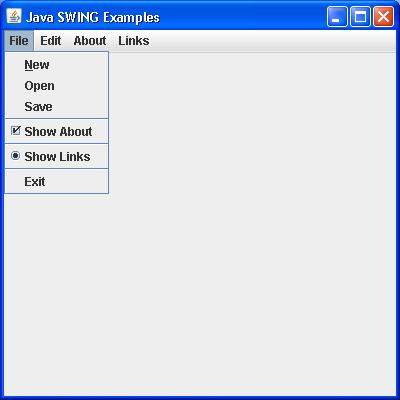
验证以下输出。(单击“文件”菜单。)