
- Swing 编程示例
- 示例 - 主页
- 示例 - 环境设置
- 示例 - 边框
- 示例 - 按钮
- 示例 - 复选框
- 示例 - 组合框
- 示例 - 颜色选择器
- 示例 - 对话框
- 示例 - 编辑器窗格
- 示例 - 文件选择器
- 示例 - 格式化文本字段
- 示例 - 框架
- 示例 - 列表
- 示例 - 布局
- 示例 - 菜单
- 示例 - 密码字段
- 示例 - 进度条
- 示例 - 滚动窗格
- 示例 - 滑块
- 示例 - 旋转控件
- 示例 - 表格
- 示例 - 工具栏
- 示例 - 树
- Swing 实用资源
- Swing - 快速指南
- Swing - 实用资源
- Swing - 讨论
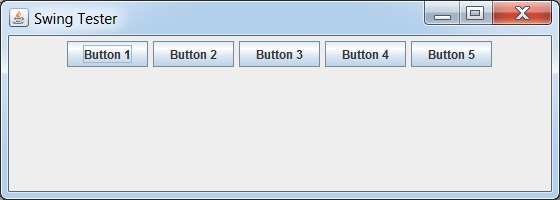
Swing 示例 - 流布局
类别 FlowLayout 将组件按从左到右的流排列。
示例
import java.awt.BorderLayout;
import java.awt.FlowLayout;

import javax.swing.JButton;
import javax.swing.JFrame;
import javax.swing.JPanel;

public class SwingTester {
   public static void main(String[] args) {
      createWindow();
   }

   private static void createWindow() {
      JFrame frame = new JFrame("Swing Tester");
      frame.setDefaultCloseOperation(JFrame.EXIT_ON_CLOSE);
      createUI(frame);
      frame.setSize(560, 200);
      frame.setLocationRelativeTo(null);
      frame.setVisible(true);
   }

   private static void createUI(final JFrame frame){
      JPanel panel = new JPanel();
      FlowLayout layout = new FlowLayout();

      panel.setLayout(layout);
      panel.add(new JButton("Button 1"));
      panel.add(new JButton("Button 2"));
      panel.add(new JButton("Button 3"));
      panel.add(new JButton("Button 4"));
      panel.add(new JButton("Button 5"));
      frame.getContentPane().add(panel, BorderLayout.CENTER);
   }
}
输出
swingexamples_layouts.htm
广告