
 数据结构
数据结构 网络
网络 关系数据库管理系统
 操作系统
操作系统 Java
Java MS Excel
 iOS
iOS HTML
HTML CSS
CSS Android
 Python
 C 编程
C 编程 C++
C++ C#
C# MongoDB
 MySQL
MySQL Javascript
 PHP
PHP 物理
物理 化学
化学 生物
生物 数学
数学 英语
英语 经济学
经济学 心理学
心理学 社会学
社会学 时尚研究
时尚研究 法律研究
法律研究在 Tkinter 中获取用户输入
可能有时我们需要在 Tkinter 应用程序中获取用户输入。我们可以通过 Entry 小组件使用 get() 方法获取单行文本输入中的用户输入。要显示捕获的输入,我们可以打印屏幕上的消息或在 标签小组件 的帮助下显示输入。
示例
#Import the required Libraries
from tkinter import *
from tkinter import ttk

#Create an instance of Tkinter frame
win= Tk()

#Set the geometry of Tkinter frame
win.geometry("750x250")

def display_text():
   global entry
   string= entry.get()
   label.configure(text=string)

#Initialize a Label to display the User Input
label=Label(win, text="", font=("Courier 22 bold"))
label.pack()

#Create an Entry widget to accept User Input
entry= Entry(win, width= 40)
entry.focus_set()
entry.pack()

#Create a Button to validate Entry Widget
ttk.Button(win, text= "Okay",width= 20, command= display_text).pack(pady=20)

win.mainloop()
输出
运行上述代码将显示一个窗口,其中包含一个接受单行用户输入的输入小组件。
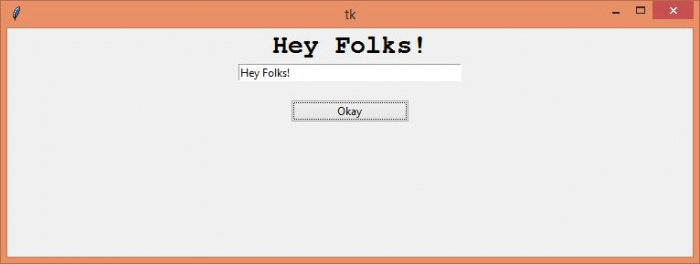
现在,在给定的输入小组件中写一些文本,然后按“确定”来验证并显示屏幕上的输入小组件。

更新时间:2023-09-14
3.6 万+ 浏览量

广告