
 数据结构
数据结构 网络
网络 RDBMS
RDBMS 操作系统
操作系统 Java
Java MS Excel
 iOS
iOS HTML
HTML CSS
CSS Android
 Python
 C 编程
C 编程 C++
C++ C#
C# MongoDB
 MySQL
MySQL Javascript
 PHP
PHP 物理
物理 化学
化学 生物
生物 数学
数学 英语
英语 经济学
经济学 心理学
心理学 社会学
社会学 时尚学
时尚学 法律学
法律学使用 Selenium 等待包含 JavaScript 的复杂页面加载。
我们可以用 Selenium 等待包含 JavaScript 的复杂页面加载完毕。页面加载完毕后,我们可以调用 Javascript 方法 document.readyState,并等待它返回 complete。
语法
JavascriptExecutor js = (JavascriptExecutor)driver;
js.executeScript("return document.readyState").toString().equals("complete");
接下来,我们可以使用同步中的 显式等待 概念来验证页面是否已准备好采取任何操作。我们可以等待针对该元素预期的条件 presenceOfElementLocated。我们将在 try-catch 块中实现整个验证。
示例
import org.openqa.selenium.By;
import org.openqa.selenium.WebDriver;
import org.openqa.selenium.WebElement;
import org.openqa.selenium.chrome.ChromeDriver;
import org.openqa.selenium.support.ui.ExpectedConditions;
import org.openqa.selenium.support.ui.WebDriverWait;
import org.openqa.selenium.JavascriptExecutor;
public class PageLoadWt{
   public static void main(String[] args) {
      System.setProperty("webdriver.chrome.driver",
      "C:\Users\ghs6kor\Desktop\Java\chromedriver.exe");
      WebDriver driver = new ChromeDriver();
      driver.get("https://tutorialspoint.com/index.htm");
      // Javascript Executor to check page ready state
      JavascriptExecutor j = (JavascriptExecutor)driver;
      if (j.executeScript
      ("return document.readyState").toString().equals("complete")){
         System.out.println("Page loaded properly.");
      }
      //expected condition presenceOfElementLocated
      WebDriverWait wt = new WebDriverWait(driver,3);
      try {
         wt.until(ExpectedConditions
         .presenceOfElementLocated
         (By.id("gsc−i−id1")));
         // identify element
         driver.findElement
         (By.id("gsc−i−id1")).sendKeys("Selenium");
      }
      catch(Exception e) {
         System.out.println("Element not located");
      }
      driver.quit();
   }
}
输出
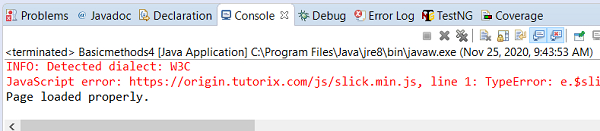

更新于:2020 年 11 月 30 日
3K+ 浏览

广告