
 数据结构
数据结构 网络
网络 关系数据库管理系统 (RDBMS)
 操作系统
操作系统 Java
Java MS Excel
 iOS
iOS HTML
HTML CSS
CSS Android
 Python
 C 编程
C 编程 C++
C++ C#
C# MongoDB
 MySQL
MySQL Javascript
 PHP
PHP 物理
物理 化学
化学 生物
生物 数学
数学 英语
英语 经济学
经济学 心理学
心理学 社会研究
社会研究 时尚研究
时尚研究 法学研究
法学研究使用 Selenium WebDriver 了解加载页面的具体时间?
我们可以使用 Selenium webdriver 确定加载页面的具体时间。借助 System.currentTimeMillis 方法,可以捕获页面加载之前的时间。
在应用程序的 URL 启动后,我们必须借助显式等待条件等待页面完全加载。一旦达到元素的预期条件,我们将再次记录当前时间。
在页面加载之前和之后记录的时间差将测量出加载页面的具体时间。
语法
long s = System.currentTimeMillis();
示例
import org.openqa.selenium.By;
import org.openqa.selenium.WebDriver;
import org.openqa.selenium.WebElement;
import org.openqa.selenium.firefox.FirefoxDriver;
import org.openqa.selenium.support.ui.ExpectedConditions;
import org.openqa.selenium.support.ui.WebDriverWait;
public class PageLoadTime{
   public static void main(String[] args) {
      System.setProperty("webdriver.gecko.driver",
         "C:\Users\ghs6kor\Desktop\Java\geckodriver.exe");
      WebDriver driver = new FirefoxDriver();
      //capture time before page load
      long s = System.currentTimeMillis();
      //URL launch
      driver.get("https://tutorialspoint.com/videotutorials/subscription.php");
      //verify page is loaded
      WebDriverWait wt = new WebDriverWait(driver,6);
      wt.until(ExpectedConditions.elementToBeClickable (By.className("s-buy")));
      //capture time after page load
      long e = System.currentTimeMillis();
      //compute time
      long r = e – s;
      System.out.println("Page load time in milliseconds: " + r);
      driver.close();
   }
}
输出
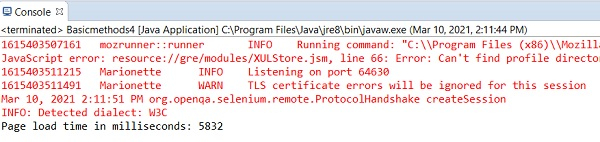

更新于: 06-Apr-2021
4 千 + 次浏览

广告