
 数据结构
数据结构 网络
网络 RDBMS
RDBMS 操作系统
操作系统 Java
Java MS Excel
 iOS
iOS HTML
HTML CSS
CSS Android
 Python
 C 编程
C 编程 C++
C++ C#
C# MongoDB
 MySQL
MySQL JavaScript
 PHP
PHP 物理
物理 化学
化学 生物
生物 数学
数学 英语
英语 经济
经济 心理学
心理学 社会学
社会学 时尚
时尚 法律
法律Tkinter Menu 中的“tearoff”属性有什么作用?
使用 Tkinter.Menu,我们可以创建菜单和子菜单。此外,还有一些其他属性可与 Tkinter 菜单一起使用。
Tearoff 属性使得窗口中的菜单可以撕掉。tearoff 属性接受一个布尔值以将菜单从主窗口或父窗口中分离出来。使用 tearoff 属性,我们有两种选择,
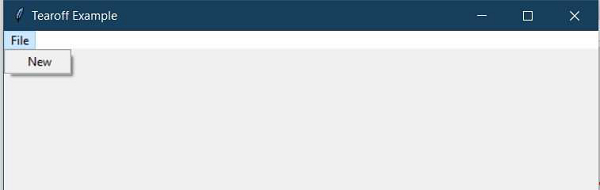
如果 tearoff=0,则使菜单粘贴到窗口。
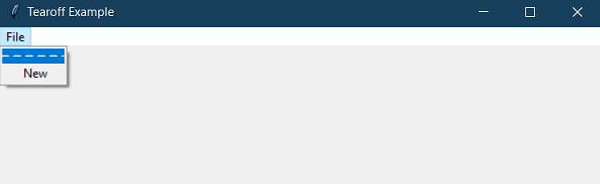
如果 tearoff=1,则在菜单上显示一个“----”空虚线,我们可以通过它将菜单从窗口中分离出来。
示例
#Importing the tkinter library
from tkinter import *
win= Tk()
win.title("Tearoff Example")
win.geometry("600x500")

#Define a Function for Menu Selection Event
def mytext():
   lab= Label(win,text= "You have made a selection", font=('Helvetica',20)).pack(pady=20)

#Create a Menubar
menu_bar = Menu(win)

#Make the menus non-tearable
file_menu = Menu(menu_bar, tearoff=0)

#Tearable Menu
#file_menu= Menu(menu_bar, tearoff=1)
file_menu.add_command(label="New",command=mytext)
# all file menu-items will be added here next
menu_bar.add_cascade(label='File', menu=file_menu)
win.config(menu=menu_bar)

mainloop()
输出
运行以上代码段将生成输出,并显示一个带菜单的窗口。
因此,对于不可撕开和可以撕开的菜单(tearoff=0 和 tearoff=1),输出如下 −

更新于: 06-03-2021
773 次浏览

广告