
 数据结构
数据结构 网络
网络 RDBMS
RDBMS 操作系统
操作系统 Java
Java MS Excel
 iOS
iOS HTML
HTML CSS
CSS Android
 Python
 C编程
C编程 C++
C++ C#
C# MongoDB
 MySQL
MySQL Javascript
 PHP
PHP 物理
物理 化学
化学 生物
生物 数学
数学 英语
英语 经济学
经济学 心理学
心理学 社会研究
社会研究 时装研究
时装研究 法律研究
法律研究使用Python Tkinter的单词字典
在本文中,我们将使用PyDictionary和Tkinter模块创建一个基于GUI的字典。
PyDictionary是一个Python模块,有助于获取词义、同义词和反义词。它使用WordNet获取释义,使用谷歌翻译,使用synonym.com获取同义词和反义词。PyDictionary使用BeautifulSoup和Requests模块作为依赖项。
为了创建该应用程序,我们将首先使用pip install PyDictionary在我们的环境中安装这些模块。
安装后,我们将创建一个Tkinter框架以及其他一些元素。
示例
# Import Required Librares
from tkinter import *
from PyDictionary import PyDictionary

# Create instances and objests
dictionary = PyDictionary()
win =Tk()

#Define the size of the window
win.geometry("700x400")

win.title("Python Dictionary")

#Define Helper Function to use the other atributes of PyDictionary Class
def dict():
   meaning.config(text=dictionary.meaning(word.get())['Noun'][0])

#Define Labels and Buttons
Label(win, text="Dictionary", font=("Times New Roman" ,20)).pack(pady=20)

# Frame 1
frame = Frame(win)
Label(frame, text="Type any Word ", font=("Poppins bold", 15)).pack(side=LEFT)
word = Entry(frame, font=("Times New Roman", 15))
word.pack()
frame.pack(pady=10)
# Frame 2
frame1 = Frame(win)
Label(frame1, text="Meaning:", font=("Aerial", 18)).pack(side=LEFT)
meaning = Label(frame1, text="", font=("Poppins",15), width= 30)
meaning.pack()
frame1.pack(pady=10)

Button(win, text="Find", font=("Poppins bold",15), command=dict).pack()

# Execute Tkinter
win.mainloop()
输出
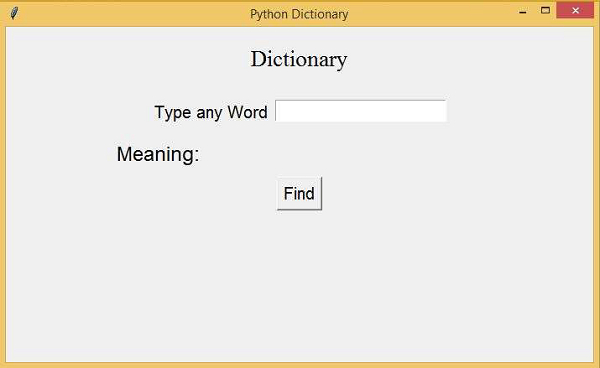
运行以上代码将创建并显示字典应用程序。但是,使用PyDictionary,我们可以添加其他属性,如查找同义词、反义词等。
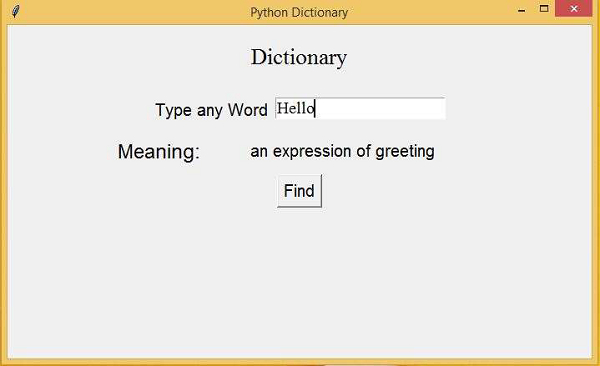
现在,在文本框中输入“Hello”,然后单击“查找”按钮。它将从字典中提取“Hello”的含义。

更新于:2021年3月6日
3000+次浏览

广告