
 数据结构
数据结构 网络
网络 关系数据库管理系统 (RDBMS)
 操作系统
操作系统 Java
Java MS Excel
 iOS
iOS HTML
HTML CSS
CSS Android
 Python
 C 语言编程
 C++
C++ C#
C# MongoDB
 MySQL
MySQL Javascript
 PHP
PHP 物理学
物理学 化学
化学 生物学
生物学 数学
数学 英语
英语 经济学
经济学 心理学
心理学 社会研究
社会研究 时尚研究
时尚研究 法律研究
法律研究编写一个程序,在 React Native 中显示“Hello World”?
React Native 安装到您的系统后,您应该在 App.js 中获得如下默认代码:
import React from 'react';
import { StyleSheet, Text, View } from 'react-native';
export default class App extends React.Component {
   render() {
      return (
         <View style = {styles.container}>
            <Text>Open up App.js to start working on your app!</Text>
               <Text>Changes you make will automatically reload.</Text>
                  <Text>Shake your phone to open the developer menu.</Text>
               </View>
            );
         }
      }
      const styles = StyleSheet.create({
      container: {
         flex: 1,
         backgroundColor: '#fff',
         alignItems: 'center',
         justifyContent: 'center',
   },
});
现在您可以根据需要更改代码。我们这里感兴趣的是在应用程序中显示文本 Hello World。
首先,您需要导入所需的组件和模块。我们需要 React 模块,因此让我们首先导入它,如下所示:
import React from 'react';
接下来,让我们导入我们将在代码中用来显示文本 Hello World 的其他组件。
import { StyleSheet, Text, View } from 'react-native';我们导入了 StyleSheet、Text 和 View 组件。我们需要 StyleSheet 组件来设置 View 和 Text 组件的样式。View 组件将是父组件,Text 组件将是其子组件。
App 是导出的默认类,运行项目后,您应该能够在设备上看到 `
export default class App extends React.Component {
   render() {
   return (
      <View style = {styles.container}>
         <Text>Open up App.js to start working on your app!</Text>
            <Text>Changes you make will automatically reload.</Text>
               <Text>Shake your phone to open the developer menu.</Text>
         </View>
      );
   }
}
将文本更改为 Hello World,如下所示:
export default class App extends React.Component {
   render() {
      return (
         <View style = {styles.container}>
            <Text>Hello World</Text>
         </View>
      );
   }
}
样式的 props 添加到 View 组件。给定的值是 styles.container。props 值必须放在花括号 {} 中,即 style={styles.container}。
styles 对象是使用 StyleSheet.create() 创建的。您所有组件的样式都可以在 StyleSheet.create() 内定义。现在我们已经定义了用于 View 组件的容器样式 `
const styles = StyleSheet.create({
   container: {
      flex: 1,
      backgroundColor: '#fff',
      alignItems: 'center',
      justifyContent: 'center',
   },
   forText: {
      color: 'green',
      fontSize: '25px'
   }
});
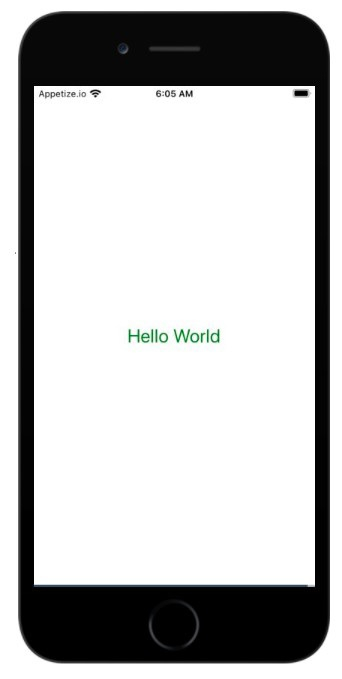
这是使用 React Native 在您的移动屏幕上显示 Hello World 的完整代码。
import React from 'react';
import { StyleSheet, Text, View } from 'react-native';
export default class App extends React.Component {
   render() {
      return (
         <View style = {styles.container}><Text style={styles.forText}>Hello World</Text></View>
         );
      }
   }
   const styles = StyleSheet.create({
      container: {
         flex: 1,
         backgroundColor: '#fff',
         alignItems: 'center',
         justifyContent: 'center',
   },
   forText: {
      color: 'green',
      fontSize: '25px'
   }
});
输出

更新于:2021年7月1日
1K+ 次浏览

广告