
- XPath 教程
- XPath - 首页
- XPath - 概览
- XPath - 表达式
- XPath - 节点
- XPath - 绝对路径
- XPath - 相对路径
- XPath - 轴
- XPath - 运算符
- XPath - 通配符
- XPath - 谓词
- XPath 有用资源
- XPath - 快速指南
- XPath - 有用资源
- XPath - 讨论
XPath - 节点函数
XPath 定义了以下节点运算符,可与 XPath 表达式配合使用。
| 序号。 | 运算符及说明 |
|---|---|
| 1 | / 用于选择特定节点下的节点。 |
| 2 | // 用于从根节点选择节点 |
| 3 | [...] 用于检查节点值 |
| 4 | | 用于两个节点集的并集 |
XPath 定义了以下节点函数,可与 XPath 表达式配合使用。
| 序号。 | 函数及说明 |
|---|---|
| 1 | comment() 选择作为注释的节点。 |
| 2 | node() 选择所有类型的节点。 |
| 3 | processing-instruction() 选择作为处理指令的节点。 |
| 4 | text() 选择文本节点。 |
| 5 | name() 提供节点的名称。 |
| 6 | position() 提供节点的位置。 |
| 7 | last() 选择相对于当前节点的最后一个节点; |
示例
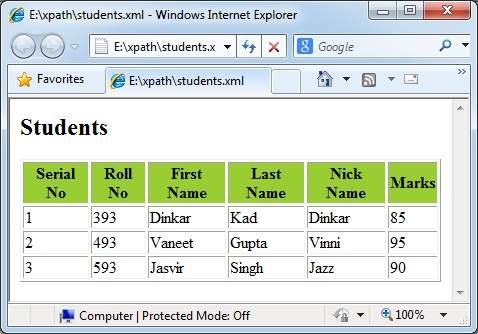
此示例创建一个表,其中包含 <student> 元素及其详细信息,方法是对每个 student 进行迭代。它计算学生节点的位置,然后打印学生详细信息以及序号。
students.xml
<?xml version = "1.0"?>
<?xml-stylesheet type = "text/xsl" href = "students.xsl"?>
<class>
   <student rollno = "393">
      <firstname>Dinkar</firstname>
      <lastname>Kad</lastname>
      <nickname>Dinkar</nickname>
      <marks>85</marks>
   </student>
   <student rollno = "493">
      <firstname>Vaneet</firstname>
      <lastname>Gupta</lastname>
      <nickname>Vinni</nickname>
      <marks>95</marks>
   </student>
   <student rollno = "593">
      <firstname>Jasvir</firstname>
      <lastname>Singh</lastname>
      <nickname>Jazz</nickname>
      <marks>90</marks>
   </student>
</class>
students.xsl
<?xml version = "1.0" encoding = "UTF-8"?>
<xsl:stylesheet version = "1.0"
   xmlns:xsl = "http://www.w3.org/1999/XSL/Transform">

   <xsl:template match = "/">
      <html>
         <body>
            <h2>Students</h2>

            <table border = "1">
               <tr bgcolor = "#9acd32">
                  <th>Serial No</th>
                  <th>Roll No</th>
                  <th>First Name</th>
                  <th>Last Name</th>
                  <th>Nick Name</th>
                  <th>Marks</th>
               </tr>

               <xsl:for-each select = "class/student">
                  <tr>
                     <td><xsl:value-of select = "position()"/></td>
                     <td><xsl:value-of select = "@rollno"/></td>
                     <td><xsl:value-of select = "firstname"/></td>
                     <td><xsl:value-of select = "lastname"/></td>
                     <td><xsl:value-of select = "nickname"/></td>
                     <td><xsl:value-of select = "marks"/></td>
                  </tr>
               </xsl:for-each>

            </table>
         </body>
      </html>
   </xsl:template>
</xsl:stylesheet>
验证输出
xpath_operators.htm
广告