
 数据结构
数据结构 网络
网络 RDBMS
RDBMS 操作系统
操作系统 Java
Java MS Excel
 iOS
iOS HTML
HTML CSS
CSS Android
 Python
 C 编程
C 编程 C++
C++ C#
C# MongoDB
 MySQL
MySQL Javascript
 PHP
PHP 物理学
物理学 化学
化学 生物学
生物学 数学
数学 英语
英语 经济学
经济学 心理学
心理学 社会学
社会学 时尚研究
时尚研究 法律研究
法律研究在 HTML 网页上添加 YouTube 视频
可以轻松地将视频从 YouTube 添加到您的网页。您只需要嵌入视频即可。
首先,获取视频编号 −
步骤 1:转到视频并右键单击。选择“关于此视频” −
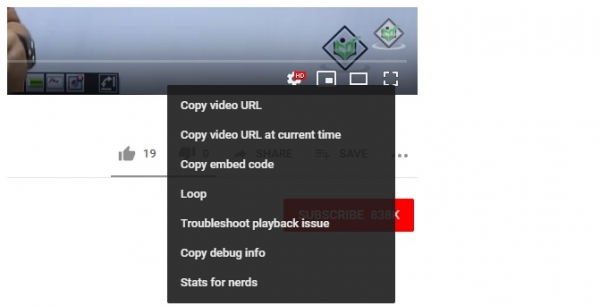
单击后,您将看到以下对话框,显示统计信息 −
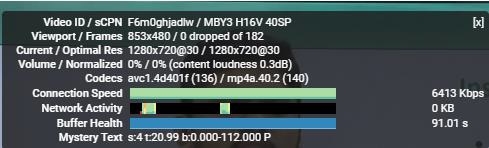
上面您可以看到视频编号为 F6m0ghjadlw。现在,我们将使用其编号嵌入同一个视频 −
示例
<!DOCTYPE html>
<html>
<head>
   <title>Learn WordPress</title>
</head>
<body>
   <h1>WordPress Installation</h1>
   <p>Following is the video demonstrating how to install WordPress on localhost using
   XAMPP Server:</p>
   <iframe height="350" width="600"
      src="https://www.youtube.com/embed/F6m0ghjadlw">
   </iframe>
</body>
</html>
输出
以下是成功在网页上嵌入 YouTube 视频的输出显示 −

您还可以使用 <embed> 标记实现相同功能。以下是 HTML 代码 −
示例
<!DOCTYPE html>
<html>
<head>
   <title>Learn WordPress</title>
</head>
<body>
   <h1>WordPress Installation</h1>
   <p>Following is the video demonstrating how to install WordPress on localhost using
   XAMPP Server (video uploaded using embed element):</p>
   <embed height="350" width="600" src="https://www.youtube.com/embed/F6m0ghjadlw">
</body>
</html>
输出
输出显示视频已成功嵌入 −


更新于: 2023 年 11 月 24 日
858 次观看

广告